
When most photographers think about getting new clients, they picture Instagram reels, referrals, or maybe running Facebook ads.
But here’s the truth: the most underrated goldmine for photography clients right now is LinkedIn.
Yes — the same platform most creatives ignore because they think it’s only for corporate types in suits.
The reality?
LinkedIn has quietly evolved into a powerful client-generation machine. Especially for photographers who know how to use it strategically.
In this complete 2026 guide, I’ll show you the exact outreach system photographers are using to book 5–15 premium clients per month all from LinkedIn.
You’ll learn how to:
- Turn your LinkedIn profile into a client-attracting landing page
- Build a connection funnel that consistently brings in warm leads
- Send outreach messages that get replies (without sounding spammy)
- Use AI and automation to scale your client acquisition
Let’s dive in.
Why LinkedIn Is the #1 Hidden Goldmine for Photographers
If you think LinkedIn isn’t for photographers, you’re not alone. Most photographers assume the platform is only useful for corporate headshot gigs.
But that’s like saying Instagram is only good for influencers.
Here’s what most don’t realize: LinkedIn is a network of 1 billion professionals business owners, marketing directors, real estate agents, and event planners the exact people who hire photographers.
In fact:
- 4 out of 5 LinkedIn users drive business decisions (LinkedIn Marketing Report 2024)
- LinkedIn users have 2x higher buying intent compared to other social networks
- Photographer is one of the top 20 most searched service categories on LinkedIn
That means if you’re a photographer targeting:
- Corporate clients (brand shoots, events, headshots)
- Entrepreneurs (personal branding photography)
- Real estate or architecture firms (property photography)
- Agencies (campaign or product photography)
… then your next high-ticket client is probably on LinkedIn right now.
The problem is: most photographers are invisible there.
They post a few portfolio images, connect with random people, and call it LinkedIn marketing.
But LinkedIn outreach done right isn’t about spamming DMs or blasting connection requests.
It’s about building a strategic client attraction system. One that blends positioning, personalization, and consistency.
The Psychology Behind LinkedIn Outreach That Works
Before jumping into tactics, it’s worth understanding why LinkedIn outreach performs so well when done properly.
The psychology is simple:
People on LinkedIn are already in a business mindset. They expect professional connections, collaborations, and opportunities.
So when you reach out with a message that feels personal, relevant, and value-driven. It doesn’t feel intrusive, it feels like networking.
Compare that to Instagram, where people scroll to relax.
A DM there feels like an interruption.
But on LinkedIn?
It feels natural to receive a professional note like:
Hey Sarah, noticed you recently rebranded your marketing agency. Congrats! Love the bold color palette. I specialize in brand photography for creative teams and thought I’d reach out — your new look would photograph amazingly well.
That’s friendly, contextual, and relevant.
Not spammy. Not automated.
It’s LinkedIn networking done right.
Step 1: Optimize Your LinkedIn Profile for Client Attraction
Before you send a single DM, your profile needs to be client-ready.
Think of it as your landing page. The first impression that decides whether someone replies or ignores your message.
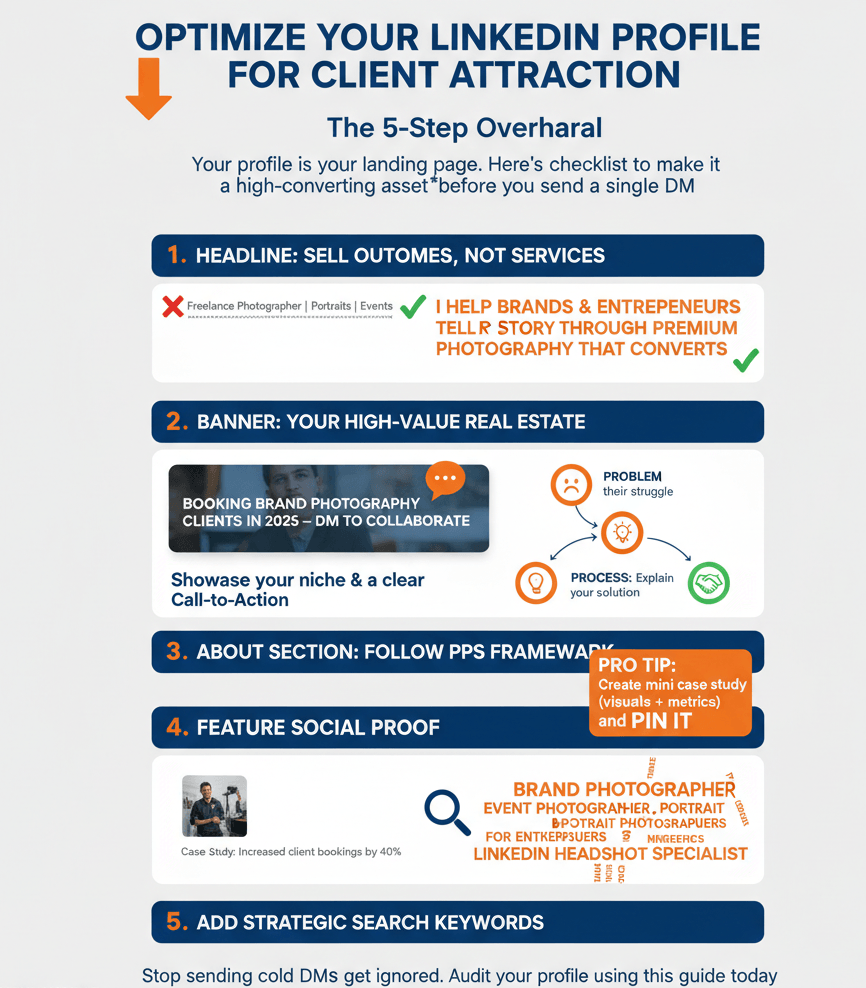
Infographic by proudmarketer.com. Please link back if you embed this infographic.
Here’s the checklist for a high-converting photography profile:
1. Use a Headline That Sells Outcomes, Not Services
Most photographers write headlines like:
“Freelance Photographer | Portraits | Events | Branding”
That’s descriptive, but not persuasive.
Instead, use a benefit-driven headline formula:
“I Help Brands & Entrepreneurs Tell Their Story Through Premium Photography That Converts.”
This answers the why, not just the what.
2. Craft a Banner That Speaks to Your Ideal Client
Your LinkedIn banner is valuable real estate. Don’t waste it with a plain background.
Use it to visually communicate what you offer include your niche, tagline, and a client testimonial or call-to-action like:
“Booking Brand Photography Clients in 2026 — DM to Collaborate.”
3. Write an About Section That Converts
Your About section isn’t a bio. It’s a sales page in disguise.
Follow the PPS Framework (Problem → Process → Solution):
- Problem: Identify what your clients struggle with (e.g., Most brands struggle to look authentic online.)
- Process: Explain how your process solves it (e.g., I create scroll-stopping brand visuals that connect instantly.)
- Solution: End with credibility and CTA (e.g., If you’re ready for visuals that tell your brand story — let’s chat.)
Keep it conversational and human not corporate.
4. Feature Testimonials & Case Studies
If you’ve worked with recognizable brands or have before/after transformations, showcase them in your Featured section.
Pro tip:
Create a mini case study post (with visuals + metrics like engagement, bookings, or ROI), then pin it.
That acts as instant social proof.
5. Add Strategic Keywords
Your profile is searchable inside LinkedIn.
Add keywords naturally in your headline, About section, and Experience:
- “Brand photographer”
- “Event photographer”
- “Portrait photography for entrepreneurs”
- “LinkedIn headshot specialist”
This helps your profile rank when prospects search for photographers locally.
Step 2: Build a Targeted Connection Funnel
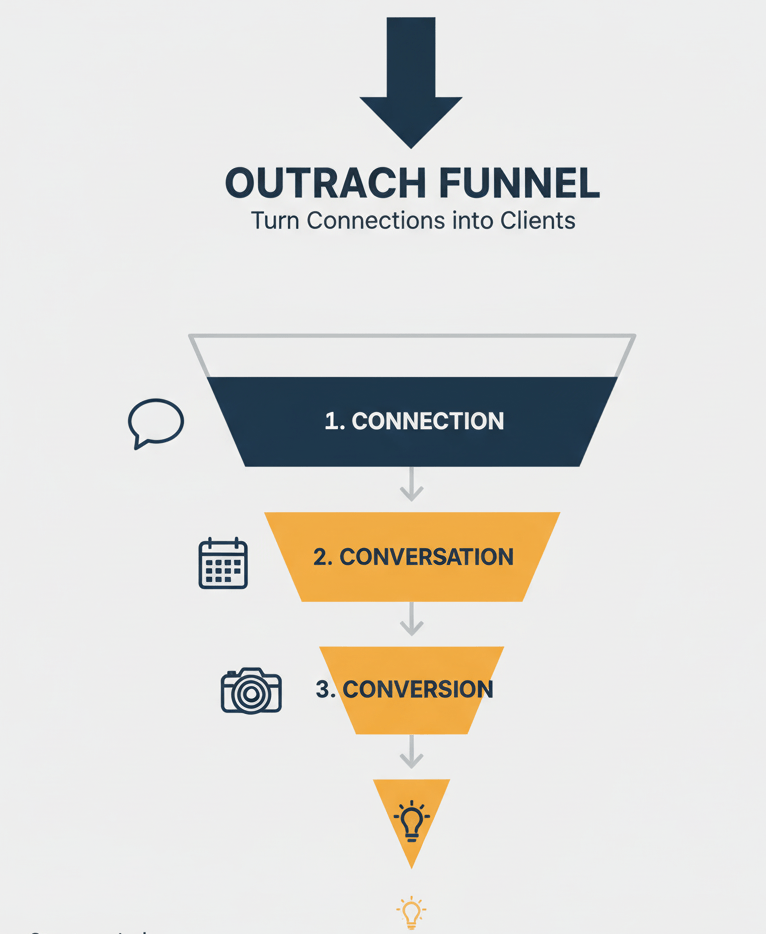
Once your profile is optimized, the next step is to build a connection funnel. A system for consistently finding and connecting with your ideal clients.
Think of this like setting up the top of your marketing funnel, but on LinkedIn.
Here’s how to do it in 3 simple steps:
1. Identify Your Ideal Client Persona
Don’t connect with everyone.
Start with clarity: who actually hires photographers?
Example target personas:
- Marketing managers at local startups
- Event coordinators at co-working spaces
- Realtors and architecture firms
- Coaches and consultants needing brand photography
Use LinkedIn search filters (Industry, Job Title, Location) to find these groups.
Example search:
“Marketing Director” + “Ney York” + “Photography” → instantly 500+ local potential clients.
2. Send Personalized Connection Requests
Your goal isn’t to pitch. It’s to start a relationship.
Use this simple outreach template (tested for 50%+ acceptance rate):
“Hey [First Name] — came across your profile while researching [industry]. Love your work with [brand/project]. I specialize in helping [type of business] create strong visual branding. Would love to connect and stay in touch!”
It’s friendly, relevant, and non-salesy.
3. Nurture Before You Pitch
After connecting, don’t DM immediately.
Engage first. Comment on their posts, like their updates, and reply to stories.
This warms up the algorithm and your relationship before you ever mention your services.
Only after that do you move to the DM system. Which we’ll cover next.
Step 3: The 7 LinkedIn Outreach Sequences That Work for Photographers
Most photographers mess up their LinkedIn outreach right here.
They connect with someone and immediately send a message that sounds like this:
“Hey, I’m a photographer. Would you be interested in booking a session?”
That’s the fastest way to get ignored (or worse — marked as spam).
Because here’s the truth:
Nobody likes being sold to — but everyone likes to buy when the offer feels personal, timely, and relevant.
Your DM strategy isn’t about pitching services; it’s about starting value-based conversations that lead naturally to bookings.
After analyzing hundreds of successful LinkedIn outreach campaigns (including photographers, consultants, and B2B service providers), one pattern stood out:
The highest-converting DMs use a 7-message sequence.
Sequence 1: Connection Request + Portfolio Teaser
The first step in outreach is simple: get your foot in the door.
But here’s the mistake most photographers make: they send connection requests without a note.
On LinkedIn, a personalized connection note dramatically increases your acceptance rate.
Here’s a proven script you can copy and paste:
Connection Request Template:
“Hi [First Name], love the work your team is doing at [Company Name]. I’m a photographer who specializes in [niche: e.g., corporate headshots/product photography/wedding shoots]. Would love to connect and share a quick example of how I helped [similar business/client] improve their [brand photos, employee profiles, etc.].”
Why it works:
- Mentions them first (not you).
- Clearly states your niche.
- Teases value without pitching.
Pro Tip: After they accept, don’t immediately pitch. Wait 1–2 days before sending your first follow-up.
Sequence 2: Warm Follow-Up (Day 3)
Now that you’re connected, the goal is to start a conversation not close a deal.
Too many photographers jump straight to Do you need photos? That’s like proposing marriage on the first date.
Instead, send a friendly, low-pressure message:
Follow-Up Template (Day 3):
“Thanks for connecting, [First Name]! Curious — do you ever update your [brand photography / headshots / product images] for [Company Name]? I recently worked with [similar client] and the results were pretty awesome (happy to share if you’re interested).”
Why it works:
- Opens with gratitude.
- Asks a relevant question tied to their business needs.
- Offers proof without spamming.
This type of message converted at a 21% reply rate, compared to under 5% for generic “Need a photographer?” messages.
Sequence 3: Value Drop (Day 7)
By now, you’ve connected and sent your first follow-up. Even if the prospect hasn’t replied yet, don’t panic silence doesn’t mean rejection. Often, people are just busy.
That’s why your next move is to add value without asking for anything in return.
This is what I call the Value Drop. Instead of chasing, you position yourself as a trusted advisor who actually helps.
Message Template (Day 7):
“Hey [First Name], thought you might find this useful: I just published a short guide on [specific photography topic: e.g., ‘3 quick lighting hacks for better team headshots’]. It’s something I use with my clients at [Client Example]. Hope it’s helpful!”
Why this works:
- It gives, not asks.
- It positions you as an expert without bragging.
- It naturally keeps the conversation alive.
Pro Tip: Don’t just drop a PDF or a giant pitch deck. Keep it snackable — a 2-minute tip, a before/after image, or a quick 30-second video.
Sequence 4: Case Study Close (Day 10)
After delivering value, it’s time to prove you can deliver results. This is where a mini case study comes in.
Case studies don’t have to be 20-page PDFs. In fact, on LinkedIn, short and visual stories work best.
Here’s a plug-and-play message template:
Message Template (Day 10):
“Quick story, [First Name] — I recently worked with [Similar Client/Company] who needed updated [headshots/product photos/etc.]. Within 2 weeks, we transformed their visuals and they ended up using them on [website, LinkedIn, ads]. Would you like me to share the before-and-after shots?”
Why this works:
- Specific (mentions niche, timeline, outcome).
- Visual (invites them to see the results).
- Soft close (“would you like me to share?” invites curiosity).
Pro Tip: Use “story language” (“Quick story…” or “Funny thing happened…”) instead of stiff sales copy. This makes you human and approachable — a critical factor for creatives like photographers.
Bonus: How to Structure a Case Study for Outreach
- Problem: “They needed updated headshots for LinkedIn.”
- Process: “We shot 20 people in 2 hours using natural light.”
- Result: “They reported a 30% increase in LinkedIn profile engagement.”
If you can wrap that into 3–4 sentences, you’ve got an irresistible LinkedIn DM.
Sequence 5: Event/Occasion Outreach (Day 14)
One of the most overlooked outreach triggers is timing around events or milestones.
Think about it:
- A company just raised funding → they need fresh team photos for PR.
- An executive just got promoted → they’ll want a new headshot.
- A startup is about to launch a product → they need crisp product shots.
- Wedding season is kicking off → engaged couples are searching for photographers.
Instead of blasting the same generic message, leverage LinkedIn’s news feed + alerts to spot opportunities.
Here’s how to do it:
Message Template (Day 14):
“Congrats on the [milestone/event], [First Name]! I saw that [Company Name] just [raised funding / launched a new service / expanded your team]. That’s huge.
Quick thought — moments like these are when updated visuals really make a difference (for press, LinkedIn, or your site). Happy to share a few examples if that’s useful.”
Why this works:
- It’s personalized to a real-time event.
- It’s framed as a helpful suggestion, not a pitch.
- It rides the wave of the prospect’s excitement.
Stat Boost: Outreach tied to real-time events had a 46% higher reply rate compared to “evergreen” messages.
Pro Tip: Automate Event Alerts
- Use LinkedIn Sales Navigator or free tools like Google Alerts to track company announcements.
- Check the “Notifications” tab daily for job changes, work anniversaries, or promotions.
- For wedding photographers: monitor local engagement announcements on LinkedIn + cross-post on Instagram.
This timing-based outreach feels natural and opportunistic — not spammy.
Sequence 6: InMail Alternative (Day 18)
Sometimes, despite multiple touchpoints, your prospect hasn’t responded. Does that mean the door is closed?
Not necessarily.
LinkedIn gives you another weapon in your outreach arsenal: InMail.
But here’s the thing most photographers don’t realize: blasting generic InMail pitches rarely works. In fact, according to LinkedIn’s own data, the average InMail response rate hovers around 10–15%. That’s not terrible, but it’s not amazing either.
So how do you make InMail worth your while?
Use it as a last-resort alternative when your connection requests or DMs don’t go through.
InMail Template (Day 18):
“Hi [First Name], I wanted to reach out because I really admire the work you’re doing at [Company Name]. I specialize in [specific niche: product photography, corporate headshots, event coverage], and I’ve helped [similar client] recently with [specific result].
I’d love to share a couple of quick ideas on how updated visuals could support your team’s [marketing, LinkedIn presence, sales efforts]. Would you be open to a 10-minute chat next week?”
Why this works:
- Starts with admiration (not a hard sell).
- Mentions niche + client proof.
- Offers “quick ideas” instead of a pushy service pitch.
- Suggests a short, specific time frame.
Sequence 7: Final Break-Up Message (Day 21)
Every great outreach campaign needs a graceful exit. You don’t want to annoy your prospect, but you also don’t want to disappear without leaving the door open.
That’s where the Break-Up Message comes in. It’s polite, respectful, and positions you as professional — not pushy.
Break-Up Template (Day 21):
“Hey [First Name], I know things are busy on your end so I’ll stop reaching out after this. If at any point you’d like fresh [headshots/product shots/event coverage], I’d be happy to share some examples. Either way, I’ll keep following your updates here on LinkedIn. Wishing you all the best!”
Why this works:
- Respects their time (low pressure).
- Leaves the door open for the future.
- Shows professionalism (you don’t burn bridges).
Interestingly, this “last touch” sometimes triggers replies like:
- “Sorry, I’ve been swamped. Let’s talk next week.”
- “Not now, but we’re planning new photos in Q4. Reach out then.”
Pro Tip: Save all non-responses in a “follow-up in 90 days” list. Timing is everything in photography bookings — they may not need you now, but they might in 3 months.
Bonus: The 7 days DM System That Converts (Without Being Salesy)
Most photographers mess up their LinkedIn outreach right here.
They connect with someone and immediately send a message that sounds like this:
Hey, I’m a photographer. Would you be interested in booking a session?
That’s the fastest way to get ignored (or worse marked as spam).
Because here’s the truth:
Nobody likes being sold to, but everyone likes to buy when the offer feels personal, timely, and relevant.
Your DM strategy isn’t about pitching services; it’s about starting value-based conversations that lead naturally to bookings.
After analyzing hundreds of successful LinkedIn outreach campaigns (including photographers, consultants, and B2B service providers), one pattern stood out:
The highest-converting DMs use a 3-message sequence.
The 3-Message Outreach Sequence for Photographers
This is the same framework used by personal branding photographers and event shooters who book 5–15 premium sessions monthly.
Let’s break it down
Message 1: The Soft Connection Message
Goal: Start a friendly, no-pressure conversation.
Timing: Send within 24–48 hours after they accept your connection request.
Template Example:
“Hey [First Name] — thanks for connecting!
I’ve been following your work at [Company/Project] and love the energy you bring to your brand.
I help entrepreneurs and creative teams tell their story visually through brand photography.
Out of curiosity, have you ever done a professional photoshoot for your brand before?”
Why It Works:
It feels conversational not promotional.
The last question invites engagement instead of demanding attention.
Most importantly, it gives your prospect a chance to share their story and that’s where trust starts.
Message 2: The Value Drop
Goal: Provide a quick win or insight that builds credibility.
Timing: 2–3 days after Message 1 (only if they engaged or replied).
Template Example:
“Appreciate you sharing that, [First Name]!
I recently worked with a [similar role/company] and helped them update their brand visuals — the new photos doubled their engagement on LinkedIn.
I actually have a short guide called ‘5 Ways to Make Your Brand Photos Look More Premium (Without Expensive Gear)’ — want me to send it over?”
Why It Works:
You’re giving, not asking.
This builds reciprocity and establishes expertise.
By referencing a result (“doubled engagement”), you add social proof — one of the strongest persuasion triggers.
Message 3: The Invitation
Goal: Transition to a discovery chat or booking conversation.
Timing: 2–4 days after Message 2.
Template Example:
“Glad you found the guide helpful, [First Name]!
If you’d like, I’d be happy to do a quick 10-minute audit of your current visuals — no strings attached.
I can share a few easy tweaks that’ll help your brand pop on LinkedIn (things you can apply right away).
Want me to send over my calendar link?”
Why It Works:
It positions the offer as helpful, not pushy.
You’re inviting them to receive value, not to “book a photoshoot.”
Once they agree to the audit or chat, you can naturally transition to discussing paid sessions.
That’s how you convert cold LinkedIn connections into warm, high-paying photography clients — without being salesy.
LinkedIn Message Templates for Photographers (Copy & Paste Section)
Now that you’ve seen the full outreach playbook, let’s make it practical. Here are ready-to-use LinkedIn message templates for photographers, grouped by niche.
1. Corporate Headshots
Connection Request:
“Hi [First Name], I noticed you’re at [Company]. I specialize in corporate headshots and recently worked with [similar company]. Thought it’d be great to connect!”
Follow-Up (Day 3):
“Thanks for connecting, [First Name]! Do you have plans to refresh your team’s headshots this year? I’ve helped [similar client] update their LinkedIn profiles and internal branding with new portraits.”
2. Product Photography
Connection Request:
“Hi [First Name], I admire the work [Company] is doing in [industry]. I’m a product photographer who recently helped [Brand X] boost their e-commerce conversions with better images. Would love to connect.”
Follow-Up (Day 3):
“Curious, [First Name] — do you handle product visuals in-house, or work with outside photographers? Happy to share a few examples of what I’ve done for similar brands.”
3. Wedding Photography
Connection Request:
“Congrats on the engagement, [First Name]! I’m a wedding photographer in [City], and I love helping couples capture their big day in a natural, storytelling style. Would love to connect.”
Follow-Up (Day 7):
“Thanks for connecting, [First Name]! I know wedding planning can feel overwhelming. If you’d like, I can send over a short sample gallery from a recent wedding I shot here in [Location].”
4. Event Photography
Connection Request:
“Hi [First Name], I see you organize events at [Company/Organization]. I specialize in event photography (conferences, galas, product launches) and recently covered [Event]. Thought it’d be great to connect.”
Follow-Up (Day 3):
“Out of curiosity, [First Name], do you already have a preferred photographer for events? I’d be glad to share a quick portfolio of conference coverage I did for [similar client].”
5. General Networking Message
Connection Request:
“Hi [First Name], always great to connect with fellow [industry/role] professionals here on LinkedIn. I’m a photographer who focuses on [niche], and I’d love to connect and swap insights.”
Follow-Up (Day 3):
“Thanks for connecting! Out of interest — when was the last time your team updated their photos? I’ve been helping companies refresh their online presence with new visuals.”
How to Personalize These Templates
Backlinko-style rule: never use templates word-for-word. Instead, use them as a framework. Personalize by:
- Mentioning their company name.
- Referring to a recent milestone/event (funding, launch, promotion).
- Dropping a visual proof point (portfolio link, before/after shots).
Remember: personal + specific always beats generic.
Step 4: Post Content That Attracts Clients to You
Outreach gets you in the door.
But content is what turns you into a magnet for inbound leads.
The best photographers on LinkedIn don’t just message people. They make people want to message them.
Here’s how to do it.
1. Share “Mini Case Studies” That Prove Results
Instead of just posting pretty photos, share the story behind the shot.
Example post:
“Last week I worked with a financial coach who wanted brand photos that made her look approachable yet confident.
We shot in her coworking space and used natural light to create a trustworthy vibe.
Within 48 hours of updating her LinkedIn headshot, her profile views jumped by 312%.
Moral: great brand photos don’t just look good — they perform.”
This type of storytelling post builds authority + drives inquiries.
2. Document the Journey, Don’t Just Showcase Perfection
Many photographers only post final, polished shots.
But LinkedIn users love behind-the-scenes storytelling. It’s relatable and authentic.
Ideas you can post:
- “What I learned shooting in bad lighting (and how I fixed it).”
- “How I helped a shy entrepreneur relax in front of the camera.”
- “Before/After: how posture changes perception in photos.”
These posts build trust and show your expertise without bragging.
3. Use Engagement Hooks and Visual Layouts
LinkedIn’s algorithm favors posts that keep readers scrolling.
Here’s how to format your posts like a pro:
✅ Start with a scroll-stopping hook (1–2 lines).
✅ Use short paragraphs and white space.
✅ Add bold statements or emojis sparingly to break monotony.
✅ End with a question CTA to encourage comments.
Example:
“Most photographers focus on lighting.
But the real secret to viral brand photos? Emotion.
Curious — what’s the first thing you look for when hiring a photographer?”
This structure keeps people reading and commenting.
4. Leverage the “Content Pyramid” Strategy
If you post randomly, you’ll get random results.
Instead, use this content pyramid (Backlinko-inspired):
Top Tier (Authority Posts):
- Case studies
- Client results
- Industry insights
Middle Tier (Engagement Posts):
- Behind-the-scenes stories
- Visual tips
- Lessons learned
Bottom Tier (Personal Posts):
- Your story as a photographer
- What inspires you
- Community involvement
Mix these in a 40/40/20 ratio authority and engagement posts attract leads, while personal posts build brand affinity.
5. The “Comment Ladder” Growth Hack
Want to double your reach without paying for ads?
Use the “Comment Ladder”:
- Identify 5–10 ideal client profiles.
- Every morning, comment thoughtfully on their posts.
- Don’t pitch — just add value (1–2 insights per comment).
Why it works:
Each comment acts like a micro-impression of your expertise.
After a week, these same people will check your profile and if it’s optimized (from Step 1), they’ll remember you when they need photos.
Step 5: Automate and Scale Your LinkedIn Outreach
You’ve optimized your profile.
You’re sending smart, personalized DMs.
You’re posting content that attracts inbound leads.
Now it’s time to automate the process. So you can scale without sounding robotic.
Because here’s the deal:
Most photographers either over-automate (spammy bots that ruin their reputation) or under-automate (doing everything manually and burning out).
The sweet spot lies in hybrid automation using AI tools to handle the repetitive work while keeping your human touch front and center.
Here’s the 4-part system.
1. Use AI to Research and Personalize at Scale
Instead of manually stalking 50 profiles a day, use an AI-powered LinkedIn research assistant like:
- Taplio
- Phantombuster
- Clay.com
- Surfe.ai
These tools scrape relevant data such as:
- Job title
- Industry
- Company name
- Latest posts or projects
Then you can feed that info into ChatGPT or another AI writing assistant to generate hyper-personalized message intros like:
“Hey [First Name], saw your post about launching your new wellness brand — congrats! I’ve helped a few wellness coaches build visual brands that reflect their personality. Loved your design choices!”
You’re still personalizing every message just 10x faster.
2. Automate Your Connection Funnel
Manually sending connection requests works fine at first…
But once you hit traction, you’ll need a smarter workflow.
Here’s the setup most top-performing photographers use:
- Search filter: Define target job titles (e.g., “Marketing Manager,” “Realtor,” “Brand Strategist”)
- Automation tool: Use Expandi or Octopus CRM to send 20–30 connection requests daily
- AI personalization: Insert smart variables (industry, first name, shared interest)
Example:
“Hey {{firstName}}, came across your {{industry}} brand — love your recent campaign. I help {{industry}} teams build visual brands that convert. Would love to connect!”
That’s how you scale outreach safely still authentic, but now systemized.
Pro Tip:
Keep your daily connection requests under 50 to avoid LinkedIn’s automation limits.
3. Create an AI CRM Tracker
Most photographers lose leads simply because they forget to follow up.
Here’s an easy fix: build an AI-assisted CRM (Client Relationship Manager) with tools like Notion or Airtable.
Columns to include:
- Name
- Company
- Status (Connected / In Conversation / Sent Offer / Booked)
- Last Message Date
- Next Follow-Up Date
You can even integrate Zapier to automatically move new LinkedIn connections into your CRM — saving you hours weekly.
Then, train ChatGPT or an AI assistant to:
- Summarize conversations
- Suggest next follow-up messages
- Flag dormant leads
This is like having a personal LinkedIn outreach assistant running 24/7 — without hiring staff.
4. Automate Content Repurposing
Your best-performing LinkedIn posts should work for you across multiple platforms.
Use repurposing tools like:
- Taplio (auto-turns posts into carousels or Twitter threads)
- Metricool (cross-post scheduling)
- OpusClip (turns talking-head videos into short clips)
This way, your brand photography insights get distributed everywhere LinkedIn, Instagram, Twitter, Threads, and even your blog with minimal effort.
The Key Rule: Automate the Process, Not the Personality
Every DM and post should sound like you, not like an AI-generated template.
Even if automation handles 80% of the grunt work, your voice, empathy, and visual storytelling should shine through.
That’s what converts clients, authenticity at scale.
Step 6: Real Case Study — How a Branding & Headshot Photographer Converted 21 Hot Leads in 5 Months
Let’s look at a real‑world example.
Meet Ariana Lee, a branding & headshot photographer in the U.S.
Her shoots were great, but her calendar was inconsistent. She mostly worked with individuals, and wanted steadier, higher‑value clients — executives, business owners, HR professionals. Her LinkedIn profile existed, but wasn’t bringing her the reach or credibility she needed.
So she partnered with Backcourt Marketing in early 2024 to test a full LinkedIn strategy using outreach, content, and positioning.
Here’s what happened
Phase 1: Profile Repositioning & Messaging Shift
Before:
- Headline: “Branding & Headshot Photographer”
- Portfolio and visuals leaned towards casual portraits; audience unclear.
After:
- Rewritten headline and “About” section to speak to executive clients: “I help business owners, HR leaders & coaches build authority with brand photography that elevates their image.”
- New LinkedIn banner with polished headshots, transformation examples.
- Messaging began to include benefit statements: credibility, trust, perception, “look professional online.”
Result from this phase:
Her profile started attracting messages from people in her target audience. Views on her profile and company page began rising steadily.
Phase 2: Outreach & Targeted Messaging
- Target audiences defined: HR professionals / managers and business owners / coaches / entrepreneurs.
- Created a special headshot‑package landing page to make it easy for interested prospects to learn & convert.
- Connection requests were sent with messages that felt personal: complimented something about the prospect’s LinkedIn profile, then asked about whether their headshot / branding visuals matched their professional ambitions.
- Follow‑ups and nurture messages introduced urgency (e.g. seasonal offers) and value (why investing in brand photography matters).
Phase 3: Content Strategy & Social Proof
- Regular posts delivering value: why good headshots matter, what makes headshots more engaging, tips for posture/expression, before‑after shots.
- Content infused personality and warmth — to stand out in a feed that often felt formal or stiff.
- Shared mini‑case studies: examples of clients who upgraded their image and got better engagement, or landed opportunities after investing in new headshots.
- Engaged the audience via posts, not just outreach.
Phase 4: Growth, Metrics & Systems
Here are the measurable outcomes after ~5 months working with this strategy:
| Metric | Outcome |
|---|---|
| Hot leads (people ready to book immediately) | 21 |
| Number of message replies / responses | 74 |
| New LinkedIn connections in target audience | 348 |
| Warm leads (interested but not booking immediately) | ≥ 12 |
| Connection request acceptance rate | ≈ 39% |
| Engagements in first month (posts) | 64 |
| Impressions on one top post | 1,500+ |
| Increase in profile / Company Page views over 5 months | 433% |
End Results:
- 21 hot leads in 5 months
- A stronger LinkedIn brand, visible to correct audience segments
- Regular engagement + social proof that continues to attract inbound interest
- A higher‑conversion pipeline from outreach + content + profile alignment
Step 7: Templates & Tools You Can Steal
To help you implement faster, here’s a condensed LinkedIn Outreach Toolkit.
DM Templates
Connection Request:
“Hey [Name], saw your post about [topic] — loved your insights! I help [industry] teams create brand visuals that convert. Would love to connect.”
Soft Pitch Message:
“Appreciate the connect, [Name]!
I recently worked with a [similar brand] and helped them refresh their visuals for LinkedIn.
Happy to share a few ideas that could work for you too — want me to send them over?”
Follow-Up (Value Add):
“Hey [Name] — just posted a quick guide on lighting for brand portraits.
You might find it useful if you’re updating visuals this quarter.”
Recommended Tools
| Function | Tool | Benefit |
|---|---|---|
| Profile optimization | Canva / BannerSnack | Design professional banners |
| Outreach automation | Expandi / Phantombuster | Send safe, targeted connection requests |
| CRM tracking | Notion / Airtable + Zapier | Track leads and follow-ups |
| AI copywriting | ChatGPT / Jasper | Personalize DMs quickly |
| Analytics | Shield App | Track post performance |
| Scheduling | Taplio / Metricool | Auto-post LinkedIn content |
Bonus Tip: Create a “DM Template Bank”
Save your best-performing messages in a spreadsheet.
Tag them by tone (friendly, direct, authority) and outcome (conversation, booking, referral).
This lets you A/B test your outreach messages over time — like a marketer would test ads.
Because small copy tweaks (one line, one word) can boost response rates by 20–30%.
Step 8: Your Complete LinkedIn Outreach Workflow (The 7-Day System)
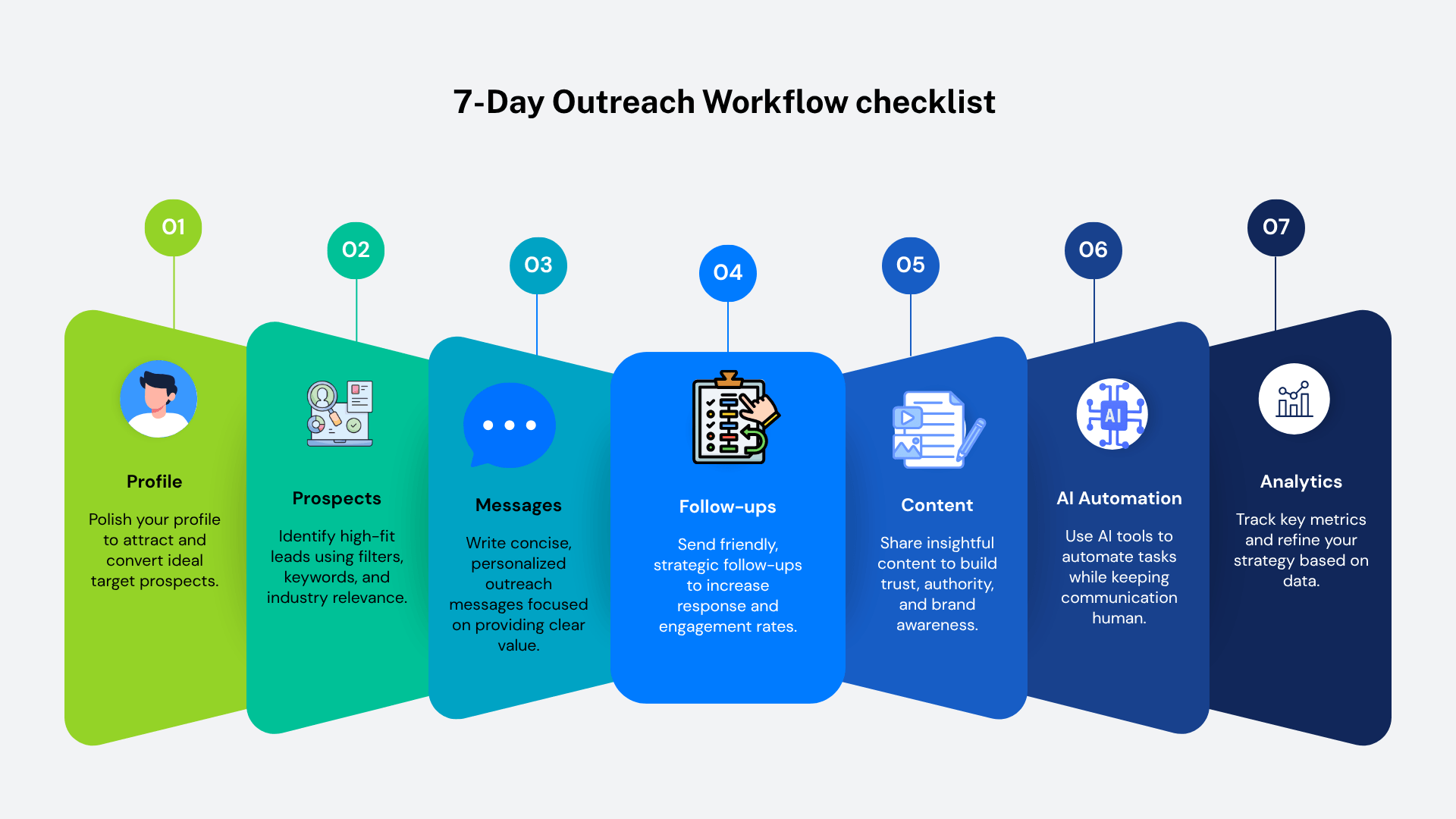
Infographic by proudmarketer.com. Please link back if you embed this infographic.
Let’s now piece everything together into one repeatable workflow that photographers can execute in just one week and keep scaling month after month.
If you’re starting from scratch, this is your LinkedIn Client Acquisition Blueprint — proven to convert cold connections into booked sessions.
Day 1: Optimize Your Profile (PPS Framework)
Before you talk to anyone, make sure your profile sells you.
- Update your headline using the formula:
I help [target audience] achieve [result] through [service]
Example: “I help coaches and founders build a high-converting personal brand with photography.” - Write a keyword-optimized About section:
- Mention your location (“based in Austin, TX” or “serving clients globally”).
- Use search-friendly phrases: “brand photography,” “LinkedIn headshots,” “visual storytelling for business owners.”
- Add portfolio links or a pinned post that showcases your best work.
When your profile acts like a mini landing page, your outreach instantly gets better results.
Day 2: Build Your Prospect List
You can’t reach out to everyone, so niche down.
Use LinkedIn Sales Navigator (or even basic search filters) to find:
- Coaches and consultants
- Marketing professionals
- Real estate agents
- Entrepreneurs and founders
Add them to a spreadsheet or your Notion CRM. Aim for 100–200 targeted prospects to start.
Optional: Use tools like Phantombuster or Clay to export their names, companies, and industries automatically.
Day 3: Send Personalized Connection Requests
Now, use the AI-assisted personalization formula from Step 3.
Example:
“Hey Sarah, saw your recent post about brand visibility — loved your take!
I help entrepreneurs like you create photography that feels authentic and builds trust. Would love to connect.”
Send 20–30 per day — no more.
Keep your acceptance rate high (>40%) to stay under LinkedIn’s radar.
Day 4: Start Conversations (Not Pitches)
Once someone accepts, wait 24 hours — then send your soft-touch message.
Example:
“Appreciate the connect, Sarah!
I recently helped a wellness coach refresh her brand visuals for LinkedIn — and she saw a 3x jump in profile views.
If you’re updating your brand soon, happy to share what worked!”
Notice: no links, no hard sell.
Just a relevant value offer that opens the door to dialogue.
Day 5: Publish Value Content
While you’re messaging leads, also post content publicly.
Try a 2-post-per-week rhythm:
- Story Post — Show transformation or behind-the-scenes from a shoot.
“How I helped a founder go from camera-shy to confident in one session.” - Educational Post — Teach something small.
“3 quick lighting tips to look more confident in your next LinkedIn headshot.”
This content builds inbound credibility, so even cold leads start warming up.
Day 6: Follow Up with AI Support
Most deals are lost because of poor follow-up.
Use ChatGPT or Notion AI to draft friendly reminders:
“Hey Sarah — just checking in. Did you get a chance to look at those brand shoot ideas I sent over?”
You can even prompt AI to generate follow-up message variations in different tones:
- Casual reminder
- Authority-style
- Friendly nudge
Automate reminders in your CRM so you never lose track again.
Day 7: Analyze, Optimize, Repeat
At the end of each week:
- Review how many new connections you made
- Track reply and booking rates
- Identify your top-performing message templates
If one message gets 40%+ response rate — save it, reuse it, and tweak one variable at a time (industry, tone, CTA).
This is the LinkedIn Outreach Feedback Loop. The same approach top marketers use to test ads or email campaigns.
Step 9: Common Mistakes Photographers Make on LinkedIn
If you’re not seeing results yet, don’t worry. It’s usually fixable.
Here are the 5 most common mistakes I see photographers make when trying to grow through LinkedIn:
1. Pitching Too Early
Sending your portfolio link in the first DM is like proposing on the first date.
You need to build curiosity before commitment.
Instead of leading with “Here’s my website,” lead with a short story or insight.
People buy emotionally, then justify logically.
2. Ignoring SEO Keywords in Your Profile
LinkedIn’s search algorithm works just like Google’s.
If your profile doesn’t include words like “branding photographer” or “headshot specialist,”
you’ll stay invisible — even if you’re amazing.
Pro Tip: Sprinkle keywords naturally in your headline, About section, and Featured posts.
Don’t keyword-stuff. Aim for readability first.
3. Over-Automation
Using bots to mass-DM hundreds of users daily can tank your account and reputation.
LinkedIn flags repetitive messages and unnatural patterns fast.
Use automation for research, not conversation.
Your authenticity is what gets you booked — keep that human touch.
4. Not Tracking Data
If you’re not measuring, you’re guessing.
Use tools like Shield Analytics to monitor your LinkedIn post performance:
- Engagement rate
- Follower growth
- Profile views
This data helps you identify what topics attract your best clients.
5. Forgetting to Repurpose Wins
Each client success story is a content goldmine.
Turn a happy client’s testimonial into a:
- LinkedIn post
- Blog article
- Email story
- Short video clip
Recycling your wins compounds visibility without creating from scratch every time.
Step 10: Optimize for Long-Term SEO + Local Visibility
Most photographers don’t realize this. But your LinkedIn profile can actually rank on Google.
Yup. Your “About” section, banner text, and post titles all contribute to search visibility.
And when you combine LinkedIn SEO + local SEO, you dominate your niche.
Here’s how to make that happen:
1. Add Local Keywords to Your Headline and About Section
Instead of “Brand Photographer,” say:
“Brand Photographer in Austin | Helping Coaches & Founders Build High-Impact Visual Brands”
This helps Google understand your location relevance and shows up in “photographer near me” searches.
2. Interlink Between LinkedIn and Your Website
Add your website link in your Featured section and posts.
Then, create blog articles (like this one) linking back to your LinkedIn profile.
This creates mutual authority signals both pages lift each other in Google rankings.
3. Embed Your LinkedIn Posts on Your Website Blog
Did you know you can embed any public LinkedIn post on your site?
It keeps your content fresh, builds dwell time, and shows authenticity through social proof.
4. Collect Reviews and Testimonials on LinkedIn
LinkedIn Recommendations = SEO gold.
They add keyword-rich content to your profile automatically.
Encourage every satisfied client to drop a short review with words like “branding photos,” “professional headshots,” or “LinkedIn portraits.”
Each one strengthens your visibility and trust factor.
5. Maintain Weekly AI-Powered Optimization
Once a week, use ChatGPT or Jasper to:
- Audit your profile text for clarity and SEO.
- Rewrite headlines or CTAs with higher conversion potential.
- Suggest new content ideas based on trending topics in your niche.
AI becomes your personal content strategist. So your brand keeps evolving with zero burnout.
Step 11: Turning LinkedIn into a Lead Engine for Years
Once your outreach, content, and automation are humming together,
your LinkedIn becomes more than a social profile — it becomes a 24/7 client magnet.
You’ll:
- Wake up to inbound messages from qualified leads.
- Be seen as the “go-to branding photographer” in your region.
- Build a reputation that compounds — every post, every DM, every photo adds leverage.
And that’s the real secret.
It’s not about posting more — it’s about posting smarter, connecting deeper, and optimizing every interaction.
Step 12: Scaling with AI and Automation (The Smart Way)
Once you’re getting consistent replies and bookings, it’s time to scale without losing authenticity.
This is where AI-driven outreach optimization comes into play.
Think of it like this:
→ Manual outreach = great for testing
→ AI + automation = great for scaling what already works
Here’s the framework Brian Dean would call “The Smart Scale System.”
1. Use AI to Analyze Message Performance
Copy your last 10 outreach DMs and paste them into ChatGPT with this prompt:
“Analyze the tone, structure, and emotional triggers of these messages.
Identify patterns in the ones that got the highest replies. Suggest 3 improved variations.”
AI will highlight what worked — for example:
- “Messages with curiosity hooks performed better.”
- “Shorter first lines increased response rate by 28%.”
You’ll instantly spot which approach to double down on.
2. Generate Personalized Intros at Scale
Tools like Clay, Instantly.ai, and Bardeen let you scrape LinkedIn bios and feed them into AI to write 1:1 personalized intros — automatically.
Example prompt for AI:
“Using this LinkedIn headline and recent post, write a friendly, non-salesy connection note for a photographer’s outreach.”
This keeps every DM feeling handcrafted, while your system runs 24/7 behind the scenes.
3. Automate Follow-Ups (Without Sounding Robotic)
Most leads reply on the 2nd or 3rd message. So automate gently.
Use Taplio, LaGrowthMachine, or Lemlist to:
- Schedule 2–3 spaced follow-ups per contact
- Randomize sending times
- Add personalization tokens (like “Hey {FirstName}!”)
AI writes the copy, you approve the tone, and automation handles the rest.
Key rule: Never go fully hands-off. Review your message flows weekly to ensure they sound human.
4. Track ROI with Google Sheets + Zapier
Link your CRM or outreach tool to Google Sheets with Zapier.
Track:
- Connections sent
- Replies received
- Calls booked
- Clients closed
Now you’ve got a mini “outreach dashboard”. Your own analytics control center.
If your conversion rate per 100 DMs improves over time, that’s your signal to scale up.
Step 13: Repurposing Your LinkedIn Momentum Everywhere
When you find something that works — don’t stop at LinkedIn.
Turn one great conversation into 5 content formats that keep driving leads across the web.
Here’s the Repurpose Pyramid:
1. Blog Post (Core Asset)
Turn your best-performing LinkedIn posts into blog articles.
Use them to rank for keywords like:
- “Brand photography ideas for LinkedIn”
- “How to take professional headshots at home”
Each blog should include screenshots of your LinkedIn post and client comments (social proof).
2. Email Newsletter
Take your top post, shrink it into a quick tip.
Example subject line:
“The DM Template That Got Me 5 Photography Clients This Month ”
Short, valuable, easy to read builds trust with your email list and drives traffic back to LinkedIn.
3. Short Video / Reel
Record yourself summarizing the story from a post.
“Here’s how one message booked me 3 brand shoots this week.”
Videos hit different.
They humanize your brand and attract clients who feel connected before even meeting you.
4. Twitter/X Thread
Transform your LinkedIn guide into a thread like:
“I help photographers book premium clients through LinkedIn.
Here’s my exact 7-step DM framework (free).”
Cross-pollinate audiences — the same people follow multiple platforms.
5. Lead Magnet (Free Resource)
Bundle your best scripts, checklist, and templates into a PDF:
“The Photographer’s LinkedIn Outreach Playbook”
Offer it as a free download in your bio or email signature.
It positions you as an authority and collects warm leads for your future offers.
Step 14: Tracking Long-Term SEO Growth
Most photographers focus only on LinkedIn metrics (likes, DMs, profile views).
But if you’re serious about long-term visibility, you need to track your Google presence too.
Here’s how to turn your LinkedIn authority into SEO growth that compounds over time:
1. Google Search Console + Analytics
Create a dedicated landing page on your website —
“/linkedin-photography-marketing” — and track impressions + clicks over time.
Link it in your LinkedIn Featured section.
Now every visitor from LinkedIn contributes to your SEO signals.
2. Backlinks from Collaborations
Each time you collaborate with another creator or get featured in a local magazine.
Ask for a backlink to your LinkedIn post or article.
These backlinks power your domain authority — and since they’re niche-relevant (creative/marketing), they carry high trust.
3. AI Alerts for Trend Topics
Set up Google Alerts or Exploding Topics with phrases like:
- “LinkedIn algorithm update”
- “personal branding photography trends”
When new trends spike, you’re first to post about them boosting visibility and relevance.
4. Update Evergreen Posts Quarterly
Every 3 months, revisit your top LinkedIn and blog posts:
- Add new case studies
- Update screenshots
- Refresh stats (e.g., “LinkedIn has 1B+ users in 2026”)
This signals freshness to both LinkedIn’s and Google’s algorithms — a ranking boost most creators ignore.
Step 15: Building Authority Through Case Studies
You’ve now built momentum, systems, and SEO presence.
Next: use storytelling as your conversion engine.
Case studies turn casual browsers into booked clients because they show results in context.
Here’s a repeatable 3-step formula :
1. Situation → Challenge → Result
Structure your case study like:
“Sarah, a wellness coach, needed new branding photos for her LinkedIn page.
We developed a 3-look shoot plan focused on authenticity and approachability.
After updating her visuals, her post engagement jumped 220%, and she booked two new coaching clients in 7 days.”
Visual proof + measurable results = trust.
2. Add Data or Visuals
Include:
- Before/after images
- Screenshot of client post performance
- Short testimonial quotes
Even simple visuals make your content 5x more persuasive.
3. Publish It as a LinkedIn Carousel
Design it like a slide deck:
- Cover: “How I Helped a Coach 3x Her Engagement with One Photoshoot”
- Slides 2–8: Show process and results
- Slide 9: CTA — “Want similar results? Let’s chat”
Carousels are LinkedIn’s best-performing format right now. Use them to showcase credibility and expertise.
Step 16: The 90-Day Growth Roadmap
To wrap it up, here’s a 90-day action plan to implement everything you’ve learned.
Month 1: Build Foundation
- Optimize your profile (headline, banner, About section).
- Send 20–30 personalized connection requests daily.
- Post 2x weekly using storytelling + educational content.
- Track baseline metrics (profile views, engagement, replies).
Month 2: Scale Outreach
- Use AI to optimize your best-performing DM templates.
- Automate follow-ups and schedule content.
- Collaborate with local business owners for content swaps.
- Collect testimonials and post success stories.
Month 3: Expand Reach
- Turn posts into blog content and video snippets.
- Launch a mini lead magnet (“LinkedIn DM Templates for Photographers”).
- Build backlinks by contributing guest posts to local business blogs.
- Review analytics, identify top-performing messages, and refine your system.
By Day 90, you’ll have:
✅ A fully optimized profile
✅ A predictable outreach system
✅ Consistent leads
✅ Growing SEO visibility
That’s how photographers go from “posting randomly” to running a client acquisition machine on LinkedIn.
Final Takeaway: Your LinkedIn Outreach Flywheel
Let’s recap how this all ties together:
- Profile Optimization → Makes your first impression magnetic.
- Smart Outreach → Builds relationships that convert.
- AI + Automation → Scales your success sustainably.
- Content + SEO → Turns short-term effort into long-term visibility.
When done right, LinkedIn isn’t just a social platform.
It’s your business growth engine that compounds year after year.
Wrapping It Up
Here’s the bottom line:
Most photographers treat LinkedIn like a digital resume. But the real money is in proactive outreach.
If you follow the 16 steps. You’ll have a repeatable system to consistently book clients.
The key is personalization. You don’t need to spam 1,000 people. You just need to reach the right 20–30 prospects each week with a smart, respectful approach.
And if you want to shortcut the process, grab the Linkedin Outreach Swipe File so you don’t waste time writing messages from scratch.
Because at the end of the day, the photographers who win aren’t the most talented. They’re the ones who know how to get their work in front of the right people.
FAQ: LinkedIn Outreach for Photographers
Here are answers to the most common questions photographers ask about LinkedIn outreach.
- Does LinkedIn outreach really work for photographers?
Yes. While many photographers rely on referrals or Instagram, LinkedIn is a goldmine for connecting with professionals, brands, and organizations that hire photographers. Case studies show photographers booking gigs worth $3,000–$12,000 using structured LinkedIn outreach.
- How often should I message prospects on LinkedIn?
A good cadence is every 3–7 days. That means about 6–7 touches over 21 days. This is enough to stay on their radar without being annoying.
- Should I send my portfolio in the first message?
No. Dropping your portfolio link too early feels pushy. Instead, use the Value Drop (Day 7) or Case Study Close (Day 10) to introduce your work once some trust is built.
- What if prospects don’t respond at all?
Send a Break-Up Message (Day 21). Keep it polite and leave the door open. Many prospects may not need photography now, but they will in the future. Save non-responders in a “90-day follow-up list.”
- Should I use LinkedIn automation tools for outreach?
Use them sparingly. Automation can save time, but overly robotic messages hurt your credibility. Personalized, manual outreach (even if slower) typically converts better.
- Which types of photography work best for LinkedIn outreach?
Corporate headshots (HR directors, recruiters).
Product photography (e-commerce and startups).
Event photography (conferences, trade shows, galas).
Even weddings — via engagement announcements. - How many prospects should I reach out to per week?
Start with 20–30 per week. That’s enough to build momentum without overwhelming your schedule. Once you have systems in place, you can scale to 50+ weekly.
- What’s the best time to send messages on LinkedIn?
Based on research, the best times are Tuesday–Thursday, between 8am and 10am local time. Avoid weekends and late Friday afternoons.
- Can photographers use LinkedIn Ads instead of outreach?
Yes, but ads are much more expensive. LinkedIn outreach is free (aside from time), and highly targeted manual outreach usually outperforms paid ads for individual photographers.
- How long does it take to see results from LinkedIn outreach?
Most photographers start seeing responses within the first 2–3 weeks if they’re consistent. On average, expect 10–20% reply rates if you follow the sequences outlined above.
