90 days ago, my photography business was dead in the water.
I had a decent portfolio, some glowing reviews from past clients, and a beautiful Instagram feed. But when someone in my city searched for a photographer on Google?
I was invisible.
No presence in the Google Maps pack. No traffic from local searches. And no steady flow of bookings.
That all changed when I decided to go all in on Local SEO.
Fast forward three months, and I saw a 300% increase in bookings without running a single ad.
In this playbook, I’m going to show you exactly what I did step-by-step. No fluff. No theory. Just the practical strategies that helped me show up on Google, outrank my local competitors, and turn clicks into paying photography clients.
And the best part? These steps work no matter what type of photography you do:
- Weddings
- Family portraits
- Product photography
- Real estate shoots
So, if you want to get found on Google, dominate the map pack, and fill your calendar with clients, this guide is for you.
TL; DR: Quick Wins
Here’s a fast preview of the system you’re about to learn:
- Optimize your Google Business Profile so you show up in the Maps 3-pack.
- Build location + service landing pages that Google (and clients) love.
- Fix your image SEO (filenames, alt text, schema).
- Collect 5-star reviews that drive trust and clicks.
- Get local backlinks from venues, vendors, and press.
- Turn traffic into bookings with conversion-focused design.
Now let’s dig into the details.
The Case Study: How I Tripled My Bookings
Before I dive into the playbook, here’s what really happened.
The Starting Point
When I checked my analytics three months ago, here’s what I saw:
- Website traffic: averaging ~100 visits per month.
- Google Business Profile (GBP): unclaimed, missing details, no photos.
- Reviews: 2 total reviews, both from years ago.
- Leads/bookings: less than 2 per month.
Meanwhile, competitors in my area had:
- Dozens (sometimes hundreds) of 5-star reviews.
- Professional GBP listings with fresh photos.
- Websites ranking for “photographer [city]” and “wedding photography near me.”
No wonder I wasn’t getting found.
What Changed
Here are the six core changes I made:
- Claimed and optimized my Google Business Profile (complete info, keywords, fresh photos).
- Built service + city landing pages (e.g., “Wedding Photographer in Austin”).
- Fixed image SEO across my site and GBP (filenames, ALT text, schema).
- Created a review generation system (email + SMS follow-up).
- Built local links through partnerships and press features.
- Optimized my site for conversions (better CTAs, booking forms, trust signals).
The Results
After 90 days, here’s what happened:
- Website traffic: jumped to ~350 visits/month (organic only).
- GBP views: up 420%.
- Leads/bookings: tripled.
- Revenue: up 3x compared to baseline.
Most importantly, I started showing up in the Google Maps 3-pack for my target terms:
- “Wedding photographer [city]”
- “Family portraits near me”
- “Engagement photography [city]”
That’s where the majority of clicks (and bookings) come from.

Step-by-Step Local Photography SEO Playbook
Here’s the exact playbook you can follow to replicate my results.
Step 1: Optimize Your Google Business Profile (GBP)
If you want to win at local photography SEO, your Google Business Profile is everything.
Why? Because:
- GBP listings show up in the Google Maps 3-pack, which dominates local searches.
- Clients trust profiles with reviews and fresh photos.
- It’s free real estate on the first page of Google.

Here’s what I did (and you should too):
- Claim your profile (if you haven’t already).
- Fill out every field: business name, categories, services, hours, phone, website.
- Add keyword-rich descriptions like “Wedding Photographer in Austin specializing in natural light portraits.”
- Upload high-quality images (portfolio shots, behind the scenes, team photos).
- Post weekly updates: promotions, blog posts, or client shoutouts.
- Enable messaging so clients can contact you directly.
- Use the Q&A section to pre-answer common questions (pricing, packages, availability).
Pro Tip: Add services with city modifiers (e.g., “Family Photography in Austin” instead of just “Family Photography”). This helps you rank for “service + city” searches.
Step 2: Create Service + Location Landing Pages
If your website only has a homepage and a contact page, you’re leaving money on the table.

Google loves specific, localized landing pages. And so do clients.
Here’s how I set mine up:
- One page per service + city. For example:
- “Wedding Photographer in Austin”
- “Family Portrait Photographer in Austin”
- “Engagement Photos in Austin”
- Each page should include:
- H1: “Wedding Photographer in Austin” (primary keyword).
- Portfolio gallery of relevant photos.
- Testimonial from a client in that city/service.
- Detailed service description (use natural keywords).
- Pricing or starting price (boosts trust).
- Call-to-action: Book a session.
- Local Business schema markup.
Pro Tip: Don’t just copy-paste the same text across pages. Customize each one with unique photos, testimonials, and city references.
Step 3: Master Image SEO (Photographers’ Secret Weapon)
Here’s the thing about photography websites: images are everything.
But most photographers upload images with filenames like:
DSC_0921.jpg
That’s a massive SEO mistake.
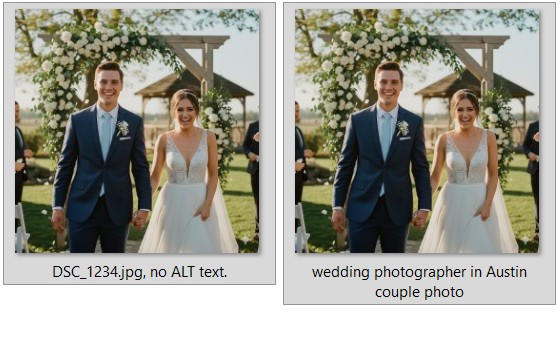
Here’s the system I used:
- Rename files with descriptive, keyword-rich filenames:
- wedding-photographer-austin.jpg
- family-portraits-austin.jpg
- Write descriptive ALT text:
- “Bride and groom at sunset – wedding photographer in Austin.”
- Compress images into WebP or JPEG-XL for faster load times.
(Google rewards fast websites.) - Add Image Object schema for important portfolio images.
- Embed EXIF data with location and copyright (optional, but helps context).
Result? My portfolio images started showing up in Google Image Search AND boosted my local rankings.
Pro Tip: Update your Google Business Profile with the same optimized images. Google connects the dots between your site and GBP.
Step 4: Build Local Links That Actually Move Rankings
Most photographers think backlinks are only for big websites.
Wrong.
If you want to rank locally, backlinks from relevant, local sites are a game changer.
Here’s the difference:
- A random link from a generic blog? Meh.
- A link from a wedding venue, local vendor, or city newspaper? That’s SEO gold.
Here’s exactly how I built my first 10 high-quality local backlinks:
- Venue Partnerships
- After shooting a wedding, I emailed the venue asking if they’d like free photos for their website.
- Most said yes. And in return, they linked back to me under “Preferred Photographers.”

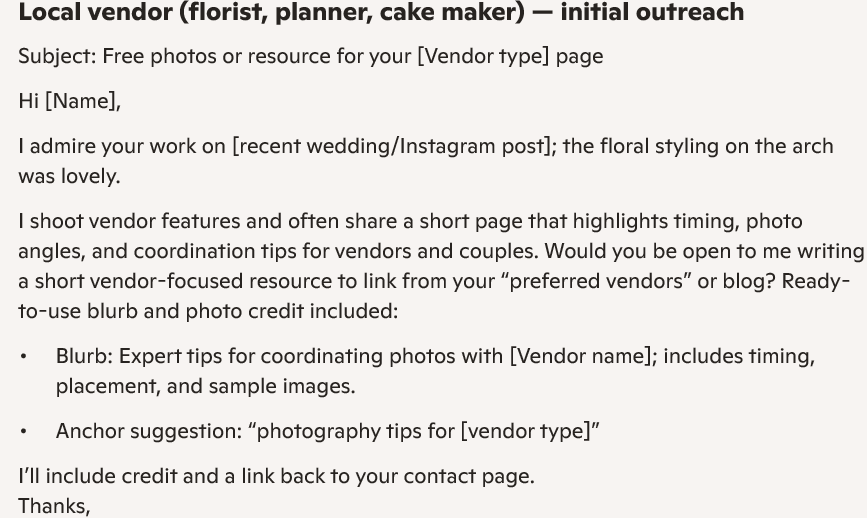
- Vendor Collaborations
- I teamed up with florists, event planners, and caterers.
- We exchanged blog posts, tagged each other on social, and added each other’s links to our websites.
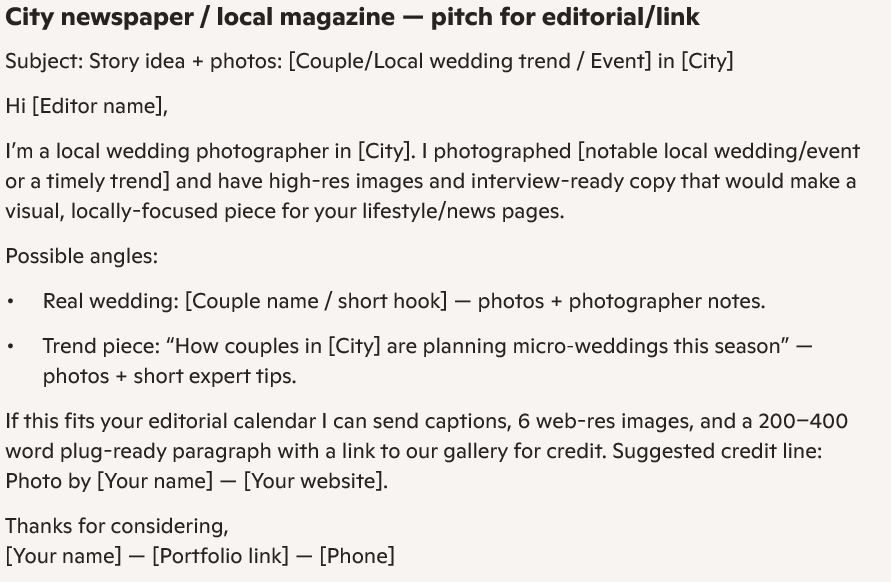
- Local Press Features
- I pitched a local lifestyle magazine about “Top Wedding Trends in Austin” and included my photos.
- They published the article with my byline + link.
- Charity & Community Events
- I volunteered to shoot photos for a local charity run.
- They linked to my site on their sponsor page.
Pro Tip: Keep your outreach email short and to the point. Something like:
Hi [Name],
I recently photographed a wedding at [Venue]. I’d love to share a set of professional images for your website/social media. Would you be open to using them? A small photo credit + link would be amazing.
Best, [Your Name]
That one email landed me 3 high-quality local backlinks in a single week.
Step 5: Get More 5-Star Reviews (Without Being Pushy)
Here’s the truth:
When someone searches for “photographer near me,” the difference between getting booked or ignored often comes down to reviews.
In fact, 89% of consumers trust reviews as much as personal recommendations.
So how do you consistently collect reviews without sounding desperate?
Here’s the system I used:
- Automated Review Requests
- Right after delivering photos, I send a thank-you email with a link to my GBP review page.
- 24 hours later, I send an SMS reminder.
- Make It Frictionless
- Don’t just say “Leave me a review.”
- Instead, use a direct link that opens the Google review box immediately.
- Script That Works
Hi [Client Name],
I loved photographing your [wedding/family session]. If you had a great experience, would you mind leaving a quick review? It helps more local families find me.
Here’s the direct link: [Insert Link]
- Reply to Every Review
- Google notices engagement.
- Sprinkle in relevant keywords naturally: “Thank you for choosing me as your wedding photographer in Austin!”
- Showcase Reviews Everywhere
- Add them to your service pages.
- Use review schema markup so they show up as stars in search results.
Result? I went from 2 reviews to 27 reviews in 3 months. And those reviews skyrocketed my Google Maps ranking.
Pro Tip: Never buy reviews. Google’s spam filter is ruthless. Focus on authentic, consistent feedback.
Step 6: Conversion Optimization
Ranking is only half the battle.
If people click your site but don’t book a session, your SEO efforts won’t pay off.
Here’s what I changed to make my website convert:
- Clear Call-to-Action (CTA)
- Every page now has a sticky “Book a Session” button.
- Contact info (phone + email) is always visible.
- Pricing Transparency
- I added “Packages starting at $499” on my homepage.
- This filtered out price shoppers and attracted serious leads.
- Social Proof Everywhere
- I embedded client testimonials and Google reviews on every service page.
- Example: “Sarah booked me as her family photographer in Austin — here’s what she said.”
- Faster Booking Flow
- Replaced a clunky 10-field contact form with a 3-field form: Name, Email, Session Type.
- Average booking requests doubled.
- Mobile-First Design
- Over 70% of local searches come from mobile.
- I tested my site on different phones to ensure load speed + booking form usability.
Pro Tip: Use a tool like Hotjar to record how people interact with your site. You’ll see exactly where they drop off.
After implementing these CRO tweaks, my conversion rate went from 1.2% to 4.8%.
Advanced Local Photography SEO Tips
Once you’ve nailed the basics, here are some advanced moves that separate you from the competition:
Add FAQ Schema to Service Pages
Most photographers ignore FAQs. Big mistake.
Google loves FAQs because they answer search intent directly.
Example: On my “Wedding Photographer in Austin” page, I added:
- How much does a wedding photographer cost in Austin?
- How far in advance should we book a photographer?
- Do you provide engagement photo sessions?
Then, I marked them up with FAQ schema.
Result? My site started showing in People Also Ask boxes.
Dominate Google Maps With Geo-Tagged Photos
Google loves fresh, relevant photos on your GBP.
Here’s the trick: upload photos with geo-tags (location coordinates in EXIF data).
So when I uploaded wedding shots from downtown Austin, Google recognized the location data. This gave me a small but noticeable boost for “wedding photographer Austin.”

Build City-Specific Blog Content
Instead of writing generic blog posts like “5 Tips for Family Photos,” I wrote:
- “Best Outdoor Locations for Family Photos in Austin”
- “Top 10 Wedding Venues in Austin (Photographer’s Perspective)”
These posts attract location-specific traffic and get shared by venues/vendors (more backlinks).
Track What Really Matters
Don’t just track traffic. Track bookings.
Here’s what I monitor:
- GBP Insights (calls, direction requests).
- GA4 Goals (form submissions).
- Ranking for service + city keywords.
This way, I know exactly which actions bring in revenue—not just clicks.
Key Takeaways So Far
At this point, you’ve learned how to:
- Build backlinks from venues, vendors, and press.
- Collect 5-star reviews without being pushy.
- Optimize your site for conversions.
- Use advanced SEO tactics like FAQ schema and geo-tagged photos.
And remember: SEO for photographers isn’t about hacking Google. It’s about showing Google (and clients) that you’re the most trustworthy, relevant choice in your city.
Bonus Strategies to Level Up Your Local Photography SEO
Once you’ve nailed the essentials—Google Business Profile, landing pages, image SEO, reviews, and CRO—you’re already ahead of 90% of local photographers.
But if you want to dominate your city (and maybe even nearby cities), here are some advanced strategies to push you over the top.
1. Create “Near Me” Content That Ranks
People don’t just search for “wedding photographer Austin.”
They also search for:
- “Best photographer near me”
- “Engagement photos near me”
- “Headshot photographer downtown Austin”
To capture those searches, I created dedicated sections on my landing pages with “near me” phrases.

Example:
Looking for a wedding photographer near you in Austin? I’ve shot weddings in downtown, East Austin, and Dripping Springs. Whether you’re in the city center or nearby, I’ll come to you.
By weaving in “near me” naturally, my pages started ranking for these hyper-local searches.
Pro Tip: Don’t stuff “near me” everywhere. Use it sparingly and in natural language.
2. Leverage Pinterest and Image Search
Here’s a little-known secret: Google Images and Pinterest drive massive local photography leads.
- I optimized my images (filenames, ALT text) not just for my site, but also for Pinterest boards.
- I created boards like “Austin Wedding Photography,” “Family Photo Ideas in Austin,” etc.
- Each pin linked back to my landing pages.
Result? Traffic doubled, and some clients told me they found me through Pinterest, not Google search.
3. Sponsor Local Events (for SEO + Exposure)
Sponsorships aren’t just about goodwill. They’re killer for local SEO.
When you sponsor a community event, your logo and website usually get featured on their sponsor page. That’s a local backlink plus brand awareness.
I sponsored:
- A local art festival.
- A charity gala.
- A small business expo.
Each gave me backlinks, photoshoot opportunities, and networking with potential clients.
4. Add Structured Data Beyond LocalBusiness
Most photographers stop at LocalBusiness schema.
But here’s how I layered in more:
- Service schema: listed “Wedding Photography,” “Family Photography,” etc.
- ImageObject schema: marked up portfolio shots.
- FAQ schema: highlighted pricing + booking questions.
This helped me capture rich snippets (stars, FAQ dropdowns, image previews).
5. Build an Email List (Yes, Photographers Need One Too)
Most photographers ignore email. Big mistake.
Why? Because email lets you stay top of mind.
Here’s my system:
- Added a lead magnet on my site: “Free Guide: 7 Best Photo Locations in Austin.”
- Collected emails via Mailchimp.
- Sent monthly newsletters with recent shoots, client stories, and promotions.
Guess what? Some past clients booked repeat sessions (family portraits, maternity photos, holiday shoots).
Email became a reliable source of repeat business.
Free Downloadable Assets (Steal My Templates)
Here’s where we turn this playbook into action.
1. Local Photography SEO Checklist (PDF)
A step-by-step, 20-point checklist covering:
- Google Business Profile setup.
- Landing page essentials.
- Image SEO best practices.
- Review system setup.
- Conversion optimization.
✅ Perfect for checking tasks off as you implement.
2. Review Request Templates (Email + SMS)
Email Template
Subject: Quick favor?
Hi [Client Name],
I loved photographing your [session type]. If you had a great experience, would you mind leaving a review?
Here’s the direct link: [Insert Link]
Thanks a ton,
[Your Name]
SMS Template
Hi [Client Name], thanks again for choosing me! If you could leave a quick review here [link], it would mean the world.
3. Venue Outreach Email Template
Subject: Photos from [Venue Name]
Hi [Name],
I recently photographed a wedding at [Venue]. I’d love to share some professional photos you could use on your site or socials.
If you’d like, please just credit me with a link back to my website.
Best, [Your Name]
This email landed me 3 backlinks in under a week.
4. Landing Page Template
Each service page should follow this framework:
- H1 with Keyword: “Wedding Photographer in Austin”
- Hero Image (optimized filename + ALT)
- Portfolio Gallery (WebP images, ImageObject schema)
- Testimonial Block with review schema
- Service Description (use semantic keywords: “natural light portraits,” “family photography Austin”)
- Pricing Section (“Packages starting at…”)
- FAQ Section with schema
- Strong CTA: “Book Your Session Today”
Final Thoughts: The Photography SEO Flywheel
When I first started, I thought SEO was only for tech companies or bloggers.
But what I discovered is this: Local SEO is the single most powerful way to grow a photography business.
Here’s why it works:
- Visibility: You get found where clients are already searching.
- Trust: Reviews and photos build instant credibility.
- Conversions: Optimized landing pages turn clicks into bookings.
And the beauty is—it compounds.
- More bookings → more reviews.
- More reviews → higher rankings.
- Higher rankings → more bookings.
That’s the SEO flywheel.
Your Next Steps
Here’s what I recommend:
- Claim + optimize your Google Business Profile today. (Takes 30 minutes.)
- Build at least 2 local landing pages this week. (Wedding + Family, for example.)
- Collect 3 new reviews using the templates above.
- Reach out to 5 local venues/vendors for backlinks.
- Download the checklist (and actually use it).
If you act on just those 5 steps, you’ll already be ahead of 80% of local photographers in your city.
Final Word
I didn’t triple my bookings because I’m the best photographer in my city.
I did it because I learned how to get found.
That’s what Local Photography SEO is all about: connecting your skills with the people already searching for you.
So don’t overcomplicate it. Follow the playbook, take it step by step, and watch your calendar fill up.
And if you want to shortcut the process, grab my Local Photography SEO Checklist right now.
Your next client is already Googling you. Time to make sure they find you.