If you’re uploading photos online whether to your website, gallery, or eCommerce store. You’re sitting on one of the most overlooked SEO goldmines: image optimization.
When done right, your images can drive thousands of visitors to your site from Google Images, boost your overall page rankings, and even improve your site’s user experience.
But most people do it wrong. They upload photos named “IMG_0254.jpg,” skip alt text, and wonder why their visual content never ranks.
That’s where Photo Album SEO comes in.
In this guide, you’ll learn 27 actionable, data-backed tips that will make your photo albums dominate Google Image Search, increase visibility, and enhance your website’s performance. All using strategies used by top brands and SEO experts.
Let’s dive in.
Why Photo Album SEO Matters More Than Ever
Before we get tactical, let’s quickly cover why optimizing your photo albums is no longer optional.
According to a SEMRush study over 30% of all Google searches return image results. And with Google Lens and visual search exploding, images are becoming a direct discovery path for users. Especially for products, travel, and lifestyle content.
If your photos aren’t optimized, you’re invisible in that growing space.
Here’s the kicker:
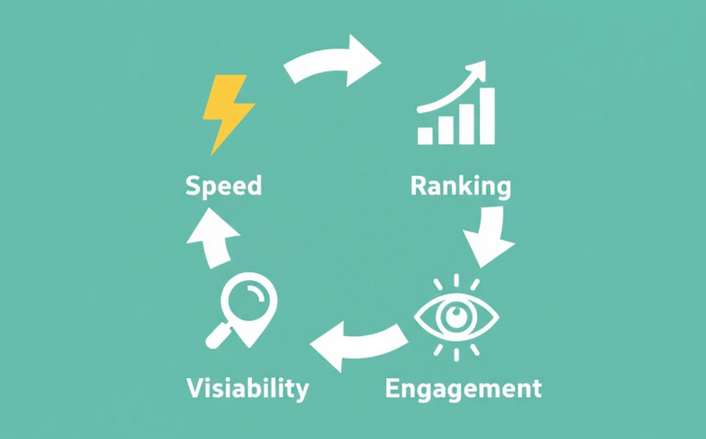
When you optimize your photo albums, you don’t just get more image traffic you also:
- Improve your page load speed (which boosts overall SEO)
- Increase your engagement metrics (time on site, click-through rate)
- Help Google understand your content context better
So yes, photo album SEO = better visibility + better rankings + better UX.
Tip #1: Start With High-Quality, Original Images
Google has made it crystal clear: unique and high-quality visuals outperform stock photos.
Backlinko analyzed over 4 million Google Image results and found that original photos had a significantly higher chance of ranking in the top 3 results.
If you’re using generic stock photos from free libraries, you’re competing with hundreds of other sites using the same image. Instead, create your own visuals even if it’s with a smartphone.
Pro tip: Use natural lighting, real environments, and consistent branding (same filter, color tone, or border style). This builds visual identity and helps Google associate your photos with your brand.
Tip #2: Use Descriptive, Keyword-Rich File Names
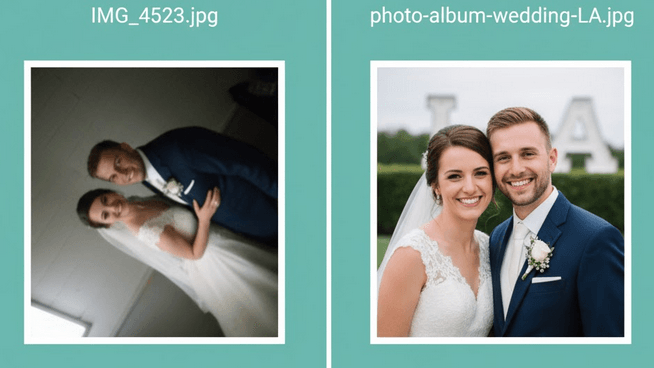
This one’s simple but powerful. Before you upload an image, rename it with descriptive keywords.
Instead of: IMG_4523.jpg
Use: photo-album-wedding-shoot-LA.jpg
Why it works: Google uses file names as a ranking signal to understand what your image is about. It’s one of the first things crawlers read.
Just keep it natural, avoid keyword stuffing. Aim for 3–6 words that accurately describe the photo.
Tip #3: Optimize Image Alt Text Like a Pro
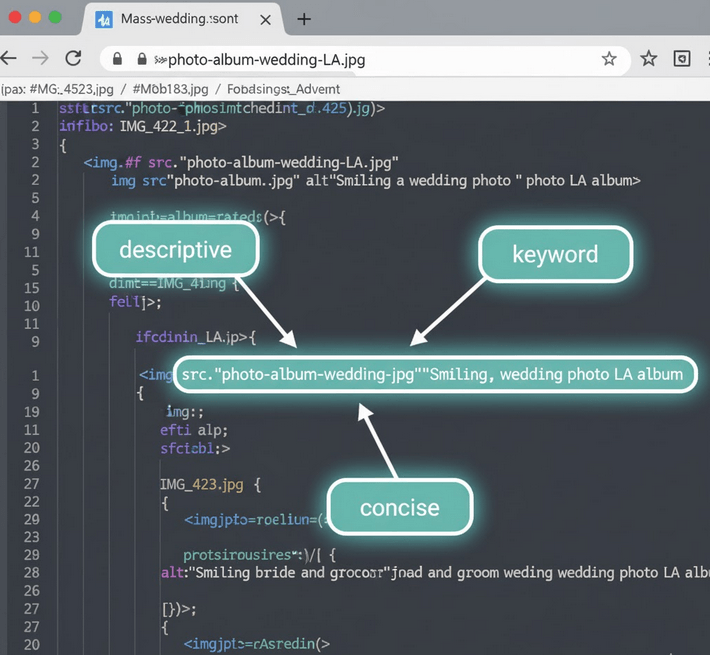
Alt text (alternative text) serves two purposes: accessibility and SEO.
It helps visually impaired users understand what’s in the image, and it gives Google valuable context.
Here’s how to write alt text that ranks:
✅ Describe what’s happening in the image (“Bride holding a bouquet at outdoor wedding”)
✅ Include your target keyword naturally (“wedding photo album”)
✅ Keep it under 125 characters
Example:
Alt text: “Bride and groom smiling during outdoor wedding – wedding photo album LA”
That’s descriptive, keyword-relevant, and human-readable — exactly what Google loves.
Tip #4: Compress Images Without Losing Quality
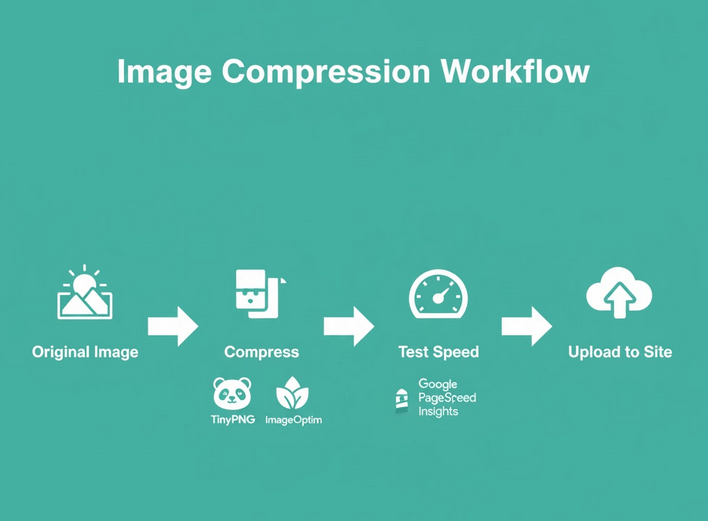
Speed kills or saves your rankings.
A slow website can destroy your SEO performance, and images are usually the #1 culprit.
Use compression tools like TinyPNG, ImageOptim, or ShortPixel to reduce file size by up to 80% without visible quality loss.
Ideal file sizes:
- Hero image: < 200 KB
- Gallery image: < 100 KB
And remember: Google’s Core Web Vitals now directly factor into rankings.
Lighter images = faster site = higher ranking potential.
Tip #5: Choose the Right File Format (JPEG vs. WebP vs. PNG)
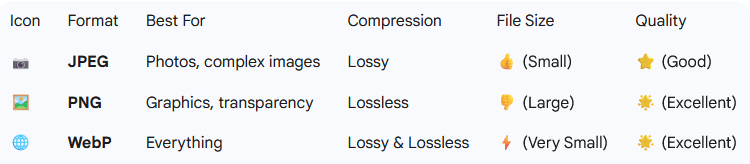
Not all image formats are created equal.
Here’s a quick breakdown:
- JPEG: Best for photos and gradients (smaller size, good quality)
- PNG: Best for graphics, logos, or transparent backgrounds
- WebP: The future. 25–30% smaller than JPEG, with the same quality
Pro move: Convert your entire photo album to WebP. It’s supported by all modern browsers and can dramatically improve your site’s performance score on tools like PageSpeed Insights.
Tip #6: Use Responsive Images for All Devices
With mobile traffic now dominating the web, your images must be responsive.
That means using srcset in your HTML or a responsive theme that automatically adjusts image sizes based on device resolution.
Example:
<img src=”photo-album.jpg”
srcset=”photo-album-400.jpg 400w,
photo-album-800.jpg 800w,
photo-album-1200.jpg 1200w”
alt=”Family photo album in living room”>
This ensures users (and Google) always get the best-quality image for their device. No unnecessary loading, no wasted bandwidth.
Tip #7: Create Image Sitemaps
An image sitemap helps Google discover and index every photo on your site even those loaded dynamically or hidden in galleries.
If you already have an XML sitemap, you can add image data to it.
Example:
<url>
<loc>https://example.com/photo-album</loc>
<image:image>
<image:loc>https://example.com/images/wedding-album.jpg</image:loc>
<image:caption>Outdoor wedding photo album</image:caption>
</image:image>
</url>
You can also use plugins like Yoast SEO, Rank Math, or All in One SEO to automatically generate image sitemaps.
This one simple step can significantly increase how many of your photos appear in Google Images.
Tip #8: Leverage Structured Data (ImageObject Schema)
If you really want your photos to stand out, use structured data markup.
The ImageObject schema tells Google exactly what your image represents, who created it, and what page it belongs to.
Example (JSON-LD format):
{
“@context”: “https://schema.org”,
“@type”: “ImageObject”,
“contentUrl”: “https://example.com/images/photo-album.jpg”,
“creator”: “Moshiur Photography”,
“creditText”: “Moshiur Studio”,
“caption”: “Sunset beach photo album cover”
}
This helps Google display richer results and improves your image’s visibility in search snippets.
Tip #9: Implement Lazy Loading for Faster Page Speed
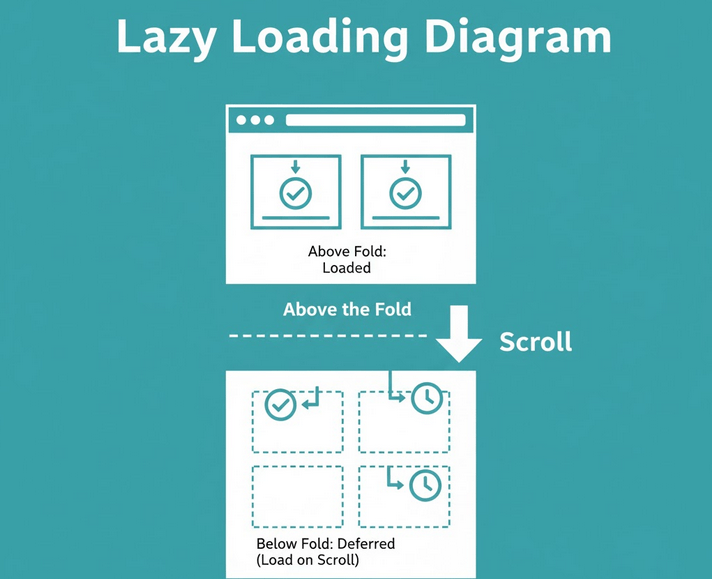
One of the easiest ways to boost both user experience and SEO is by enabling lazy loading.
Lazy loading delays the loading of images until a user scrolls near them. This means your site loads lightning-fast upfront a major advantage for SEO and Core Web Vitals.
In fact, Google’s own documentation recommends lazy loading for image-heavy pages like photo albums and portfolios.
Here’s a quick HTML example:
<img src=”photo-album.jpg” loading=”lazy” alt=”Beach wedding photo album cover”>
That single attribute (loading=”lazy”) tells the browser not to load the image until it’s visible on screen.
If you’re using WordPress, you’re in luck. Most modern themes and plugins (like WP Rocket or Semrush) already include lazy loading by default.
Faster site = lower bounce rates = higher image rankings.
Tip #10: Use a Content Delivery Network (CDN)
A CDN (Content Delivery Network) stores copies of your images on multiple servers around the world.
When someone visits your site, the images load from the nearest location not from your main server.
This dramatically cuts load time and reduces server strain.
Popular CDNs for image optimization:
- Cloudflare (free plan available)
- BunnyCDN
- Cloudinary
- Imgix
Pro tip: If you’re hosting a large photo album site, go one step further and use an image-specific CDN (like ImageKit or Cloudinary). These not only deliver images faster but also automatically compress and resize them in real-time.
That means you can serve perfectly optimized versions of each image for every device, with zero manual work.
Tip #11: Keep EXIF Data Clean and Relevant
EXIF data is the hidden information inside your photos things like camera model, date, GPS location, and exposure settings.
While EXIF data doesn’t directly influence rankings, it can help Google understand image context. Especially for location-based content like event photography, travel albums, or local businesses.
Example:
If your photo album is about “wedding photography in LA,” keeping the GPS location tag or geotag can reinforce that geographic relevance to Google Images.
However, remove unnecessary or private EXIF data before uploading. Tools like ExifCleaner or Adobe Lightroom let you keep what matters (like location) and remove what doesn’t (like device info or personal metadata).
Tip #12: Add Context Around Your Images
Here’s a secret most people miss: Google doesn’t rank images in isolation.
It ranks the page they’re on.
That means your surrounding text, headings, and captions all help Google understand what the image represents.
For example, if you upload a photo of a “boho wedding album,” don’t just drop it on a blank gallery page. Add context like this:
“This bohemian wedding photo album captures natural light, handmade details, and candid moments from the couple’s ceremony in Bali.”
Then use an H2 heading like:
“Boho Wedding Album: A Natural Love Story”
And a caption under the photo:
“Outdoor bohemian wedding ceremony captured by Moshiur Studio.”
All of this reinforces keyword relevance, making your image 10x more likely to rank.
Tip #13: Link Internally to Image-Rich Pages
Internal linking isn’t just for blog posts.
By linking to your image-heavy pages or photo albums from relevant blog content, you’re signaling to Google that those pages are important.
For instance:
If you have a blog post titled “Blog Post Ideas for Photographers for 2026”, include a link like this:
“See our full blog post Ideas here.
This simple internal link passes SEO authority (“link juice”) to your blog post page improving both the page and the images on it.
Backlinko has proven this strategy repeatedly: pages that receive more internal links rank higher, not just in text search, but in image results too.
Tip #14: Optimize Captions (They’re More Important Than You Think)
Captions are one of the few text elements directly tied to images that users read and Google knows it.
In fact, captions below images are read on average 300% more than body text.
So use that real estate wisely.
Example:
Instead of writing:“Photo from our collection.”
Write something like:
“Modern minimalist wedding photo album designed with natural tones and elegant layouts.”
That’s descriptive, keyword-relevant, and improves engagement metrics all of which influence ranking.
Tip #15: Optimize Image Placement and Layout
User experience plays a massive role in how Google evaluates your page.
A cluttered, poorly organized gallery can increase bounce rate and reduce dwell time.
Follow these layout best practices:
- Group related images under descriptive headings.
- Use a grid or masonry layout for balance.
- Include “next” and “previous” navigation for deeper browsing.
- Keep consistent padding and spacing.
And most importantly: prioritize above-the-fold images.
Google rewards pages that display useful content immediately, without requiring users to scroll endlessly.
So, if your most important photo albums are hidden deep down the page, you’re leaving traffic on the table.
Tip #16: Add Social Sharing Buttons for Images
Social signals may not be a direct ranking factor, but they influence visibility which indirectly boosts SEO.
When your audience shares your photo albums on Pinterest, Instagram, or Twitter (X), it increases backlinks, engagement, and branded searches all things Google pays attention to.
Use tools like ShareThis, AddThis, or Sassy Social Share to add share buttons directly to your images.
You can also enable Pinterest “Save” buttons to make your photo albums more discoverable on visual platforms.
Backlinko’s research shows that visual content shared on Pinterest tends to drive long-term referral traffic perfect for evergreen photo galleries.
Tip #17: Regularly Update and Re-Optimize Old Images
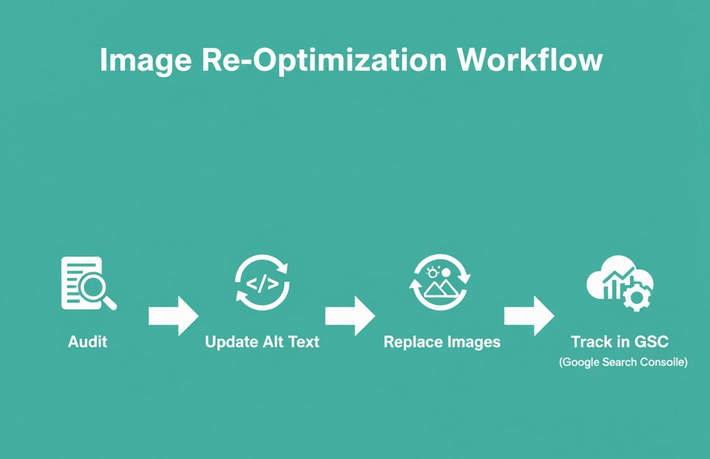
SEO isn’t “set it and forget it.”
Your image rankings can drop over time as competitors upload fresher, faster, and better-optimized content.
That’s why re-optimization is key.
Every 6–12 months:
- Revisit your top photo album pages in Google Search Console.
- Identify which images are getting impressions but low clicks.
- Update file names, alt text, and captions to match new trends or keywords.
- Replace outdated visuals with newer, higher-resolution ones.
You can even use tools like Ahrefs, SEMrush, or Surfer SEO to find trending image keywords related to your niche.
Freshness + optimization = sustained rankings.
Advanced Photo Album SEO Strategies
At this point, you’ve nailed the fundamentals file names, alt text, compression, and sitemaps.
But if you want your photo albums to outrank big brands, you’ll need to go beyond the basics.
Let’s explore some advanced image SEO strategies that separate amateurs from professionals.
Tip #18: Build Backlinks to Your Image Pages
Backlinks are the backbone of Google’s algorithm and yes, they apply to image SEO too.
When other sites link to your photo album pages (or directly to your images), it sends a strong signal of credibility and authority.
Here are some effective ways to earn image backlinks:
- Create Shareable Visual Assets:
Design infographics, templates, or styled image galleries that people want to embed or reference.
Example: “25 Free Photography Marketing Ideas That Actually Get You Clients (2026 Edition).” - Watermark Smartly:
Add a subtle watermark with your website name in the corner of your images. When others reuse your photo, they’ll often credit or link back to your site. - Reverse Image Search Outreach:
Use tools like Google Reverse Image Search or TinEye to find sites using your photos without credit. Reach out politely and request a backlink attribution. - Publish Visual Case Studies:
Combine storytelling with images e.g., “How We Designed a 300-Photo Travel Album That Got 1M Views.” These attract natural backlinks from design and marketing blogs.
Tip #19: Track Image Performance in Google Search Console
You can’t improve what you don’t measure.
Google Search Console (GSC) provides detailed insights about how your images perform in search.
To access this:
- Go to Search Results → Search Type → Image
- You’ll see which images and pages generate the most impressions and clicks.
- Identify low-CTR (click-through rate) images — these are opportunities for optimization.
Example:
If a photo gets thousands of impressions but few clicks, consider updating its title, caption, or surrounding text to make it more compelling.
Also, look at your countries and devices data. It reveals where your images are most popular and whether you should optimize for mobile or regional keywords.
Tip #20: Optimize for Google Lens and Visual Search

Visual search is exploding.
Tools like Google Lens, Pinterest Lens, and Bing Visual Search are teaching users to search using images, not words.
This is a massive opportunity for photo album creators, photographers, and eCommerce brands.
To make your photos Lens-friendly:
- Use consistent, recognizable branding (logos, watermarks, color palette).
- Include contextual elements in your photos — for example, show your product in use, not isolated on a plain background.
- Add structured data (ImageObject, Product, or CreativeWork schema).
When Google Lens scans an image, it identifies objects, logos, and text. So if your visual assets are well-branded, Lens can trace them back to your website — effectively turning your images into search entry points.
Tip #21: Make Your Photo Albums Accessible
Accessibility isn’t just an ethical requirement — it’s an SEO advantage.
Google rewards websites that are inclusive and accessible, and image accessibility plays a key part.
Here’s what to ensure:
- Alt text is descriptive and non-keyword-stuffed.
- Captions summarize visual information for context.
- Contrast ratios meet WCAG 2.1 standards (so text over images is readable).
- Avoid text baked into images — use real HTML text instead.
If your site passes accessibility checks (via tools like Wave or Axe DevTools), you’ll enjoy better usability metrics — which positively affect your search rankings.
Tip #22: Add Image Titles and Open Graph Tags for Social SEO
When users share your photo albums on Facebook, Twitter, or LinkedIn, the platform pulls data from your Open Graph (OG) tags.
Without proper OG tags, your shared posts may display random or low-quality thumbnails.
Here’s how to fix that:
<meta property=”og:image” content=”https://example.com/images/photo-album-cover.jpg”>
<meta property=”og:image:alt” content=”Modern wedding photo album design”>
<meta property=”og:title” content=”Elegant Wedding Photo Album | Moshiur Studio”>
<meta property=”og:description” content=”Explore 200+ creative wedding photography shots designed for timeless memories.”>
This ensures your shared content looks professional and clickable — boosting social engagement and indirect SEO benefits.
Tip #23: Embed Image Galleries on High-Authority Pages
Don’t bury your best albums deep within your site structure.
If you have image galleries that perform well, embed them into your top-performing blog posts or landing pages.
For instance:
If you have a post titled “10 Timeless Wedding Photography Styles,” embed your wedding album gallery in it.
Why it works:
- The page already has strong authority and backlinks.
- Embedding your album lets Google recrawl and re-index those images within a high-SEO-value environment.
Result: Faster ranking improvements and wider exposure across multiple keywords.
Tip #24: Use Analytics to Understand Image Engagement
Google Analytics 4 (GA4) now lets you track engagement with images and galleries using event tracking.
You can monitor:
- Image clicks
- Zoom interactions
- Gallery navigations
- Scroll depth to image sections
This data helps you identify which albums capture the most interest — and which need improvement.
For example, if your “Travel Photo Album 2026” gets 5x more engagement than others, create more similar albums or promote it more aggressively.
Tip #25: Boost E-E-A-T With Your Visual Content
E-E-A-T stands for Experience, Expertise, Authoritativeness, and Trustworthiness — a major ranking factor in Google’s Quality Rater Guidelines.
You can apply E-E-A-T principles to your photo albums by:
- Including author bios on album pages (who took the photos, what expertise they have).
- Adding behind-the-scenes or “creation story” sections that showcase real experience.
- Linking to social proof (client testimonials, case studies, or awards).
- Displaying EXIF metadata for authenticity.
Example:
“All images in this album were shot by Moshiur Rahman, a professional wedding photographer in Singapore with 10+ years of experience.”
This builds trust — both with users and with Google’s algorithms.
Tip #26: Repurpose Your Photo Albums for Multiple Platforms
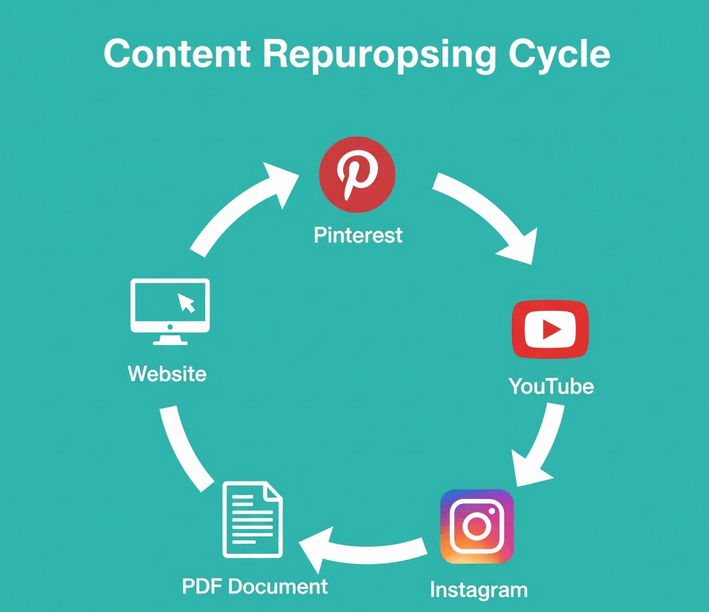
Don’t let your photo albums live only on your website.
Repurpose them across multiple platforms to create a network of backlinks and brand signals.
Here’s how:
- Upload key images to Pinterest with keyword-rich descriptions and links back to your album.
- Create a short YouTube video slideshow of the album and link to the original page.
- Post selected shots on Instagram, using hashtags and geotags for discoverability.
- Convert albums into downloadable PDF portfolios or flipbooks for content marketing.
The goal is to make your visual content omnipresent — everywhere your audience searches, scrolls, or shares.
Tip #27: Keep Technical SEO Clean and Crawlable
Finally, don’t overlook the technical side of image SEO.
Ensure:
- Your robots.txt doesn’t block image folders.
- All image URLs return status code 200 (OK).
- You use canonical tags to avoid duplicate image pages.
- Your image sitemap is updated and submitted in Google Search Console.
You can also use Screaming Frog or Sitebulb to run full image audits and identify broken links, missing alt tags, or oversized files.
Remember: technical health = better crawlability = better rankings.
Conclusion: Turn Your Photo Albums into SEO Powerhouses
Photo Album SEO isn’t just about optimizing images — it’s about building a system that connects your visuals, content, and audience into one powerful ecosystem.
When done correctly, your images don’t just look beautiful. They rank, drive traffic, and build your brand authority.
Let’s recap:
- Start with high-quality, original images.
- Use descriptive file names and alt text.
- Compress, format, and lazy load for speed.
- Create sitemaps and structured data for discoverability.
- Build backlinks, track analytics, and stay fresh with re-optimization.
Do all that, and your photo albums will become one of your site’s most valuable SEO assets.
Because as Google continues to evolve toward visual-first search, those who master Photo Album SEO today will own tomorrow’s rankings.