If you’ve ever typed your own name or business into Google and found another photographer showing up first, you’re not alone.
Thousands of talented photographers get buried under competitors simply because they’re not using the right keywords.
Great photos don’t automatically equal great visibility. Search engines don’t “see” your art. They read your words. And the words you choose (your keywords) decide whether your site ranks or disappears.
This guide reveals 200 SEO keywords for photographers real search terms people use when they’re ready to hire or learn from a photographer. Each one is an “easy win”: low competition, high buying intent, and locally adaptable (think “wedding photographer NewYork” or “portrait photographer LA”).
By the end, you’ll know:
- How to identify high-intent vs. low-intent searches.
- How to cluster keywords for each photography niche.
- How to create SEO-ready pages that attract clients, not just clicks.
- How to use local and image-based SEO to dominate your area.
Let’s start by defining what “high intent” keywords actually are.
What Are High-Intent Keywords (and Why They Matter for Photographers)

Not all keywords are created equal.
Some people search “how to take better wedding photos.” Others search “wedding photographer near me.”
Which one is more likely to become a paying client?
“Wedding photographer near me” because it shows commercial intent (they’re ready to book).
In SEO, we call that a high-intent keyword — a phrase that signals the searcher wants to take immediate action: hire, buy, or contact.
The Keyword Pyramid
Think of your keyword strategy as a pyramid:
- Top layer – Transactional keywords
→ e.g., wedding photographer New York, portrait studio near me
These convert the fastest. - Middle layer – Commercial-investigation keywords
→ e.g., best headshot photographer, affordable wedding packages
People are comparing options and prices. - Bottom layer – Informational keywords
→ e.g., how to choose a wedding photographer, how much does a photoshoot cost
Great for blog traffic and brand trust.
Most photographers only focus on one layer usually the bottom. But if you want clients, not just readers, you must build a keyword pyramid that touches all three.
How to Do Keyword Research for Photographers (Step by Step)
SEO always starts with data-driven keyword research. Here’s the method you would use & adapted.
Step 1: Start with Core Service Terms
List the main services you offer:
- Wedding photography
- Portrait sessions
- Headshots
- Real estate photography
- Product shoots
- Events
- Maternity / newborn
Now pair each service with city modifiers (location + intent).
Examples:
- wedding photographer NewYork
- portrait studio LA
- product photographer LA
- real estate photographer Chicago
This is the base of your local SEO keyword set.
Step 2: Use Google Autocomplete and “People Also Ask”

Type your main keyword into Google and see what it suggests:
- “Wedding photographer…” → near me, packages, prices, New York, reviews
- “Portrait photographer…” → studio NewYork, outdoor locations, affordable
These long-tail phrases often have lower competition but stronger intent.
Pro tip: add letters after your keyword (like “a”, “b”, “c”) to trigger more Autocomplete variations.
Step 3: Analyze Search Intent
Ask: What does the searcher want?
- If the keyword includes words like “hire,” “book,” “near me,” or a city name → Transactional
- If it includes “best,” “affordable,” “reviews,” “pricing” → Commercial Investigation
- If it includes “how,” “what,” or “tips” → Informational
Label them accordingly in your spreadsheet. This will tell you which keywords to use for service pages, pricing pages, or blog posts.
Step 4: Check Volume and Difficulty
Use tools like:
- Google Keyword Planner (free)
- Ahrefs Keywords Explorer
- Ubersuggest or SEMrush
You don’t need massive volume; you need high intent + local relevance. A keyword like “wedding photographer LA” might only get 250 searches / month — but if even 5 people book, that’s huge ROI.
Step 5: Cluster and Map Your Keywords
You can use this keyword clustering, grouping related terms into one topic.
Example cluster:
Primary Keyword | Supporting Keywords | Target Page |
|---|---|---|
wedding photographer NewYork | wedding packages NewYork, affordable wedding photographer NewYork | /wedding-photographer- NewYork / |
portrait photographer NewYork | professional headshot NewYork, family photographer NewYork | /portrait-photographer- NewYork / |
This method ensures you don’t create overlapping pages that compete (known as keyword cannibalization).
200 Easy-Win Photography Keywords (Categorized by Intent)
Now let’s get to the good part. The actual keywords photographers can target.
We’ll break them into four major categories:
- Transactional (ready to book)
- Commercial Investigation (considering options)
- Informational (learning phase)
- Local + Geo Modifiers (city or region-based)
Each keyword below can be adapted by swapping “[city]” with your actual service area.
1. Transactional Keywords – High Booking Intent
- wedding photographer [city]
- engagement photographer [city]
- portrait photographer [city]
- newborn photographer [city]
- real estate photographer [city]
- product photographer [city]
- corporate headshot photographer [city]
- event photographer [city]
- maternity photoshoot [city]
- destination wedding photographer [city]
These are your money keywords. Each one should have a dedicated service or location page optimized around it (title, H1, meta, URL).
Example URL structure:
/wedding-photographer-LA/
/portrait-photographer-NewYork/
2. Commercial Investigation Keywords
- best wedding photographer [city]
- affordable wedding photographer [city]
- top-rated portrait studio [city]
- headshot packages [city]
- wedding photographer reviews [city]
- family photographer pricing [city]
These are ideal for comparison or pricing pages. Add testimonials, sample pricing, and CTAs like “Request a Quote.”
3. Informational Keywords
- how to choose a wedding photographer
- how much is a portrait session
- how to get featured on wedding blogs
- photography tips for beginners
- how to start a photography business
- how to optimize photos for Google
These make perfect blog topics to build topical authority and internal links.
How to Rank for Local Photographer Keywords
You’ve now got your keyword list, but how do you actually rank for those “photographer near me” searches?
For photographers, local SEO is everything. Clients don’t care if a wedding photographer in NewYork ranks #1 globally. They want someone nearby.
Here’s how you would break it down, step-by-step
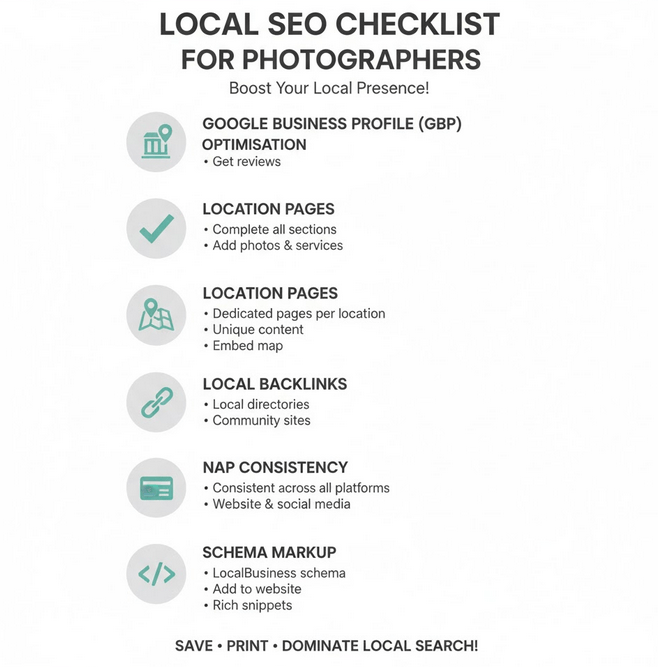
Step 1: Optimize Your Google Business Profile (GBP)
Your Google Business Profile (formerly Google My Business) is your most powerful ranking lever for local searches. It’s how you appear in the Google Map Pack — those top three listings under the map.
Do this:
- Claim and verify your profile at google.com/business
- Use your primary keyword in your business title: “[Studio Name] – Wedding Photographer [city]”.
- Fill out every field — categories, hours, services, and description.
- Upload geo-tagged photos with filenames like wedding-photographer-LA.jpg.
- Add your NAP (Name, Address, Phone) exactly as it appears on your website.
Pro Tip: Post weekly updates using keywords.
Example post: “Just finished a maternity shoot in LA! Looking for a family photographer in LA? Book your session today.”
These micro-posts build local relevance. Google reads and associates them with your keywords.
Step 2: Create City-Specific Landing Pages
If you serve multiple cities, don’t stuff all your locations into one page. Instead, create dedicated location pages with unique content and photos.
Example Structure:
- /wedding-photographer-NewYork/
- /wedding-photographer- Buffalo/
- /wedding-photographer- Rochester/
Each page should have:
- 500–800 words of unique content
- Local testimonials (“Anna & David’s NewYork wedding shoot”)
- Embedded Google Map
- Internal links to your portfolio & contact form
- Local keywords in meta title, URL, and headings
Example meta title:
Wedding Photographer NewYork | Elegant, Candid Wedding Photos
These local pages often rank in the Google 3-Pack within weeks if properly optimized.
Step 3: Build Local Backlinks
You can emphasizes authority through backlinks. For photographers, that means earning links from local and industry-specific sites.
Here are high-impact sources:
- Wedding vendors & venues: ask them to list you as a recommended photographer.
- Local blogs & magazines: pitch your real weddings or event photos.
- Business directories: submit to trusted sites like Yelp, The Knot, and regional creative directories.
- Local chambers & associations: get backlinks from official business listings.
Email template example:
Subject: “Feature Idea: Stunning [Venue Name] Wedding Photoshoot”
Hey [Name],
I recently photographed a beautiful event at [Venue Name]. The photos showcase your venue perfectly — would you be open to featuring them on your blog with photo credits?
Cheers,
[Your Name]
This small outreach effort can land high-authority, niche-relevant backlinks– the kind Google loves.
Step 4: Collect Keyword-Rich Reviews
Reviews aren’t just social proof. They’re SEO gold.
Encourage happy clients to include service + location keywords in their reviews:
“Moshiur is the best wedding photographer in NewYork — we loved every photo!”
Google uses these keywords to reinforce your local relevance.
Set up an automated follow-up email:
“Hi [Name], thanks for trusting us with your shoot! If you enjoyed your photos, we’d love a short review on Google — it really helps others find us.”
Step 5: Embed Structured Data (Schema Markup)
Schema markup helps Google “understand” your business details — and can trigger rich results in search.
Here’s a basic LocalBusiness JSON-LD snippet you can add to your site footer:
{
“@context”: “https://schema.org”,
“@type”: “LocalBusiness”,
“name”: ” Susan Shek Photography”,
“image”: ” https://www.susanshek.com/wp-content/uploads/2020/12/logo1.png”,
“address”: {
“@type”: “PostalAddress”,
“streetAddress”: ” 401 Park Ave S #10/FL”,
“addressLocality”: ” New York”,
“postalCode”: ” 10016″,
“addressCountry”: ” NY”
},
“telephone”: ” +1 347-635-5577 “,
“url”: ” https://susanshek.com/ “,
“sameAs”: [
” https://www.instagram.com/susanshekphotography/ “,
” https://www.pinterest.com/SusanShekPhotography/ “
]
}
This markup reinforces your local identity, making it easier for Google to display your studio in map results.
Image SEO — The Hidden Power Behind Photography Rankings
If you’re a photographer, images are your product. But Google can’t “see” your photos. It reads metadata, filenames, and surrounding text.
Here’s how to make your images rank in Google Images, portfolio searches, and even generate local traffic.
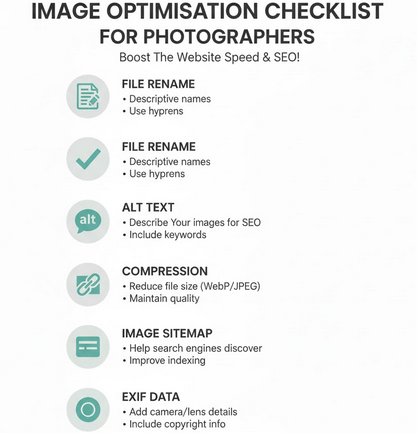
Step 1: Rename Image Files with Keywords
Before uploading, name your files descriptively — no more IMG_0345.jpg.
✅ Instead:
wedding-photographer-NewYork-Venice-Beach.jpg
portrait-photographer-NewYork-studio.jpg
This helps your image appear in Google Images for those search terms.
Step 2: Write Keyword-Rich Alt Text
The alt text describes your image for both accessibility and SEO.
Example:
alt=”Bride and groom sunset portrait by wedding photographer in NewYork”
Avoid stuffing keywords. One descriptive sentence is perfect.
Step 3: Compress and Optimize for Speed
Fast-loading pages rank higher. Use tools like TinyPNG, ShortPixel, or ImageOptim to compress images without losing quality.
Ideal sizes:
- Under 200 KB per image
- Use WebP format for faster load times
- Serve responsive images (srcset) for mobile devices
Step 4: Use Captions and Surrounding Text
Google associates image meaning with nearby text. Add small captions under key portfolio photos:
“Elegant destination wedding– captured by Susan Shek.”
This adds contextual keywords naturally and enhances user engagement.
Step 5: Create an Image Sitemap
Most photographers skip this step. But it’s a favorite for content-rich sites.
If your site has hundreds of portfolio images, create a separate image sitemap.
Example:
https://yourdomain.com/image-sitemap.xml
You can auto-generate one using plugins like Yoast SEO, RankMath, or Screaming Frog.
Submit it to Google Search Console under “Sitemaps.”
Step 6: Add EXIF Data for Local SEO (Optional)
Your camera’s EXIF data (location, lens, date) can boost local SEO when preserved.
Before uploading:
- Add geo coordinates and author name.
- Use software like Photo Mechanic or EXIF Pilot.
- Then export optimized JPEGs for the web.
This subtle metadata helps Google associate your images with your city or region.
Step 7: Build an Optimized “Portfolio” Page
Create a main portfolio page with categories (wedding, portrait, product, etc.) — each linking to its own keyword-optimized gallery.
Example structure:
- /portfolio/
- /portfolio/wedding-photography/
- /portfolio/portrait-photography/
- /portfolio/product-photography/
Each page should have:
- 3–4 short keyword-rich paragraphs
- 10–15 optimized images
- A strong CTA (“Book your shoot today”)
This structure spreads ranking potential across multiple pages and makes your site easier to crawl.
Turning Keywords into Traffic (and Clients)
Keyword research is only half the game. The real growth happens when you turn those phrases into optimized content that attracts and converts.
Here’s how you would transform your keyword list into a client-generating SEO machine.
Step 1: Map Each Keyword to a Specific Page
Don’t dump all your keywords into one generic “Services” page. Instead, build a clear keyword-to-page map.
Keyword | Intent | Page Type |
|---|---|---|
wedding photographer [city] | Transactional | Service page |
best wedding photographer [city] | Commercial | Pricing / Comparison |
how to choose a wedding photographer | Informational | Blog article |
photography packages [city] | Commercial | Pricing page |
headshot photographer [city] | Transactional | Service page |
This approach prevents keyword cannibalization (where multiple pages fight for the same keyword). Each page should have one main focus keyword and a few LSI variations.
Step 2: Optimize Your On-Page SEO
Once your pages are mapped, optimize them for user experience + search intent.
Checklist:
- Use your primary keyword in:
- Title tag (front-loaded)
- H1 heading
- First paragraph
- Image alt text
- Meta description
- Sprinkle semantic keywords (LSIs) naturally throughout the text:
e.g., “photography packages,” “photo session pricing,” “professional photographer in [city].”
- Keep paragraphs short (2–4 lines each).
- Use H2 and H3 subheadings with related phrases.
- Add a call-to-action (CTA) every 400–600 words.
“Ready to book your shoot? Let’s create something unforgettable.”
Remember, your writing philosophy is “clarity + scannability = rankings.”
Step 3: Use Internal Links Strategically
Internal links help Google understand your site structure and distribute PageRank across your pages.
Best practices:
- Link from blog posts → service pages (not the other way around).
- Use descriptive anchor text:
“Check out our wedding photography packages in NewYork.”
- Interlink related content clusters: wedding, portrait, product, etc.
Over time, these internal connections create topical authority. Google starts recognizing your website as a trusted expert in “photographer SEO keywords.”
Step 4: Craft Irresistible Meta Titles and Descriptions
Your meta title is what users see first in search results. Make it keyword-rich and clickable.
Examples:
- Wedding Photographer NewYork | Elegant, Timeless, Real Moments
- Portrait Studio NewYork | Professional Headshots & Family Photography
- Affordable Wedding Packages NewYork | Capture Your Love Story
And pair it with a benefit-driven meta description:
“Book your professional wedding photographer in Singapore today. Packages for every budget, candid photos you’ll treasure forever.”
Keep meta’s under 60 characters (title) and 155 characters (description).
Step 5: Build Authority with Backlinks
Even the best content won’t rank without authority signals (backlinks).
Here’s a-tested outreach plan tailored for photographers:
- Submit to vendor directories: The Knot, WeddingWire, Fearless Photographers, etc.
- Collaborate with venues & planners: Offer to share images of their events — ask for a credit link.
- Guest posts on creative blogs: Write “5 Tips for Amazing Wedding Photos” and link to your portfolio.
- Get featured: Submit real wedding stories to local wedding blogs and magazines.
- Use HARO or Qwoted: Respond to journalist requests on photography-related topics to earn backlinks from major sites.
Pro Tip: Add a “Featured In” section on your homepage with those backlinks. It’s SEO + social proof combined.
Bonus Section: Keyword Templates for Every Photography Niche
Every niche has its own set of money keywords. Below are templates you would use to dominate each vertical.
Replace [city] with your location and plug these into your keyword planner.
1. Wedding Photography Keywords
Transactional:
- wedding photographer [city]
- destination wedding photographer [city]
- elopement photographer [city]
Commercial:
- best wedding photographer [city]
- affordable wedding photography packages
- wedding photography reviews [city]
Informational:
- how to choose a wedding photographer
- what to ask before hiring a wedding photographer
- average cost of wedding photography [city]
Tip: Add a “Wedding Photography Pricing” page. It ranks fast and converts well.
2. Portrait & Headshot Photography Keywords
Transactional:
- portrait photographer [city]
- headshot photographer [city]
- family photography studio [city]
Commercial:
- professional headshot packages
- best portrait studio near me
- affordable headshot photographer
Informational:
- how to pose for a portrait session
- what to wear for professional headshots
Tip: Use your LinkedIn and Google Business Profile to cross-link headshot pages — that improves local discovery.
3. Real Estate Photography Keywords
Transactional:
- real estate photographer [city]
- property photographer [city]
- drone real estate photography [city]
Commercial:
- best real estate photographer [city]
- affordable property photos
- real estate photo packages
Informational:
- how to shoot real estate interiors
- best camera for property photography
Tip: Add before/after examples, they get shared and earn backlinks naturally.
4. Product & E-Commerce Photography Keywords
Transactional:
- product photographer [city]
- jewelry photography studio [city]
- food photographer [city]
Commercial:
- affordable product photographer
- e-commerce photography pricing
- product photography setup guide
Informational:
- how to shoot products for Amazon
- best lighting for jewelry photos
Tip: Add schema markup for “Product” on your examples page for rich snippets.
5. Event & Lifestyle Photography Keywords
Transactional:
- event photographer [city]
- birthday photographer [city]
- corporate event photography [city]
Commercial:
- affordable event photographer
- top-rated lifestyle photographer
Informational:
- how to capture candid moments at events
- how to plan event photography coverage
Tip: Use a “case studies” section showing your event shoots — it converts better than generic portfolios.
6. Travel & Destination Photography Keywords
Transactional:
- travel photographer [city or country]
- destination pre-wedding shoot [location]
Commercial:
- best travel photographer for hire
- travel photography packages
Informational:
- how to become a travel photographer
- gear list for destination photography
Tip: Target “Pinterest boards” and travel blogs for backlinks — perfect for SEO visibility.
Creating Blog Posts That Actually Rank
Many photographers start a blog, post three times, and quit when traffic doesn’t grow.
You blog strategy: publish fewer posts, but optimize each one like a landing page.
Example topics using our informational keywords:
- “How to Choose a Wedding Photographer (10 Questions to Ask Before You Book)”
- “The Complete Guide to Product Photography SEO (Even If You’re Not a Tech Person)”
- “How to Get Photography Clients Using Google Search”
Each post should include:
- 1 primary keyword in the title
- Supporting keywords in subheads
- Internal links to related service pages
- A strong CTA at the end
SEO Blog Post Formula
H1: Target Keyword
Intro: Problem + Promise + Preview
H2: Step-by-Step Solution (include numbered sections)
H2: Tools or Templates
H2: FAQ Section (use “People Also Ask” questions)
Conclusion: CTA or downloadable checklist
This structure maximizes dwell time and featured-snippet potential.
Case Study: How SEO & Keyword Optimization Tripled Leads for Wedding Photographer “Shane”
Background
Shane, a wedding photographer with about 15 years of experience and over 700 weddings under his belt. He had excellent work and a strong portfolio, but he was frustrated with the rate of new inquiries through his website. Even though he’d built up great social media content, done bridal shows, placed ads on wedding sites, and blogged frequently, the lead flow was still far below what he wanted. Despite all the effort, he felt left behind in revenue and growth.
Objectives
Working with Brendan Hufford, Shane focused on three primary goals:
- Improve his rankings for his target keywords in Google (especially terms that potential clients would type in when searching for wedding photographers).
- Increase organic traffic to his blog posts and photo/image content.
- Boost the conversion rate: turning more of the visitors to his site into leads/inquiries
Strategy & Tactics
To meet those goals, they applied several SEO and site‑optimisation strategies:
- Link Outreach and Backlink Building
They used a systematic outreach process (20 steps) to acquire high‑quality inbound links. These involved getting other websites to use Shane’s photos, write about his work, and link to his blog. This improved Shane’s authority in Google’s eyes. - On ‑Site & Content Optimization
They revised Shane’s blog posts (and old content) to better match what people were searching for. This included optimizing post titles, headers, meta descriptions, and keywords. They also ensured images had proper titles and alt text, especially using terms like “venue + wedding photography” or “location + wedding photography,” which tended to be more specific and high‑intent. - Conversion Funnel Improvements
They created clearer pathways on the site so that, once visitors landed on content or blog posts, there was an obvious way to contact Shane. They used a “funnel strategy” to send traffic from high‑value pages or posts through to an inquiry page. Making calls‑to‑action more visible, simplifying the contact/inquiry process.
Outcomes
After these changes, the results were quite dramatic:
Metric | Before | After (~2 months) |
|---|---|---|
Weekly inquiries via website | ~1 per week | Up to ~5 per week |
Revenue increase | — | An extra US$42,000 in revenue generated |
Number of weddings booked | ~12 for 2016 (by December) → completed 46 weddings in that year | For 2017, 26 weddings were already booked (early in the year) even after raising prices and reducing working hours. |
Also, Shane was able to increase his pricing, work fewer hours, and yet still fill his schedule with bridal bookings.
Key Lessons & Takeaways
From Shane’s experience, these lessons are especially relevant:
- Long‑tail, location + service combinations (“venue + wedding photography”, “city + wedding photographer”) often perform better than generic keywords.
- Optimizing existing content (old posts, blog archives, images) is as important as creating new content. Many SEO gains can come by revisiting what’s already published.
- Backlinks still matter: quality over quantity. Outreach that builds meaningful, relevant links helps both traffic and rankings.
- Conversion is crucial: more traffic won’t help unless you guide visitors toward an inquiry. Clear calls to action and well‑structured funnels are essential.
- SEO results take time but compound: early investment yields growth that picks up momentum.
Wrap-Up: Your Next 3-Step Photographic SEO Action Plan
You now have the full blueprint: keyword strategy → local & image optimization → turning keywords into traffic and clients. Here’s how to get started this week:
- Download & open the 200-Keyword Spreadsheet. Filter by Transactional + Your City. Pick the top 5 keywords and assign each to a page.
- Create or update pages. For each chosen keyword, build or optimize a service or location page using:
- Keyword in URL, title tag, H1, early copy.
- Optimized images (filename + alt text).
- Internal link from your blog/news section.
- Add a CTA: “Book your session today”.
- Outreach + Local Citations. For each page, identify 3–5 relevant backlink opportunities (venue/blog/review directory). Reach out this week.
If you execute these steps consistently, you’ll begin to see bookings from organic search rather than just traffic.
Final Optimization Checklist
Use this checklist before hitting Publish / Update on any key page:
- Target keyword in title tag (front-loaded)
- URL is short and contains the keyword
- Keyword in H1 heading
- Keyword in the first 100 words of content
- At least one image file name includes the keyword
- Alt-text on images is descriptive and contains keyword, but natural
- Content is structured with H2s/H3s and includes LSI keywords (e.g., “local photographer keywords,” “wedding photography SEO,” “image optimization for photographers”)
- Internal links to service pages + blog articles
- External links to authority sites (e.g., SEO resources, photography industry sites)
- Page loads fast, mobile-friendly, images compressed → PageSpeed OK
- Schema markup added for LocalBusiness (if relevant) and/or Service
- Backlinks or citations in progress: 1–3 targeted outreach sent
- Review or testimonial posted on GBP/Google with keyword + location
- Submit/refresh sitemap (and image sitemap if you updated images) in Google Search Console
This checklist follows many “On-Page SEO” and “SEO Strategy” principles.
Conclusion
Ranking as a photographer in 2026 doesn’t require magic, but it does require a strategy. By focusing on high-intent keywords, optimizing your local presence, treating images as SEO assets, and turning traffic into bookings, you’ll move from “another photographer” to “the photographer clients find and book first.”
Download the 200-keyword list, pick your first 5 pages, run the checklist, do the outreach. With consistent effort, you’ll start seeing measurable results.
“SEO isn’t about tricking Google. It’s about delivering the best answer to the person doing the search.” — Brian Dean (Backlinko)
Happy optimizing — now go dominate those search results!