TL; DR (Quick Summary)
Here’s how to rank your photography business #1 on Google Maps in 2026:
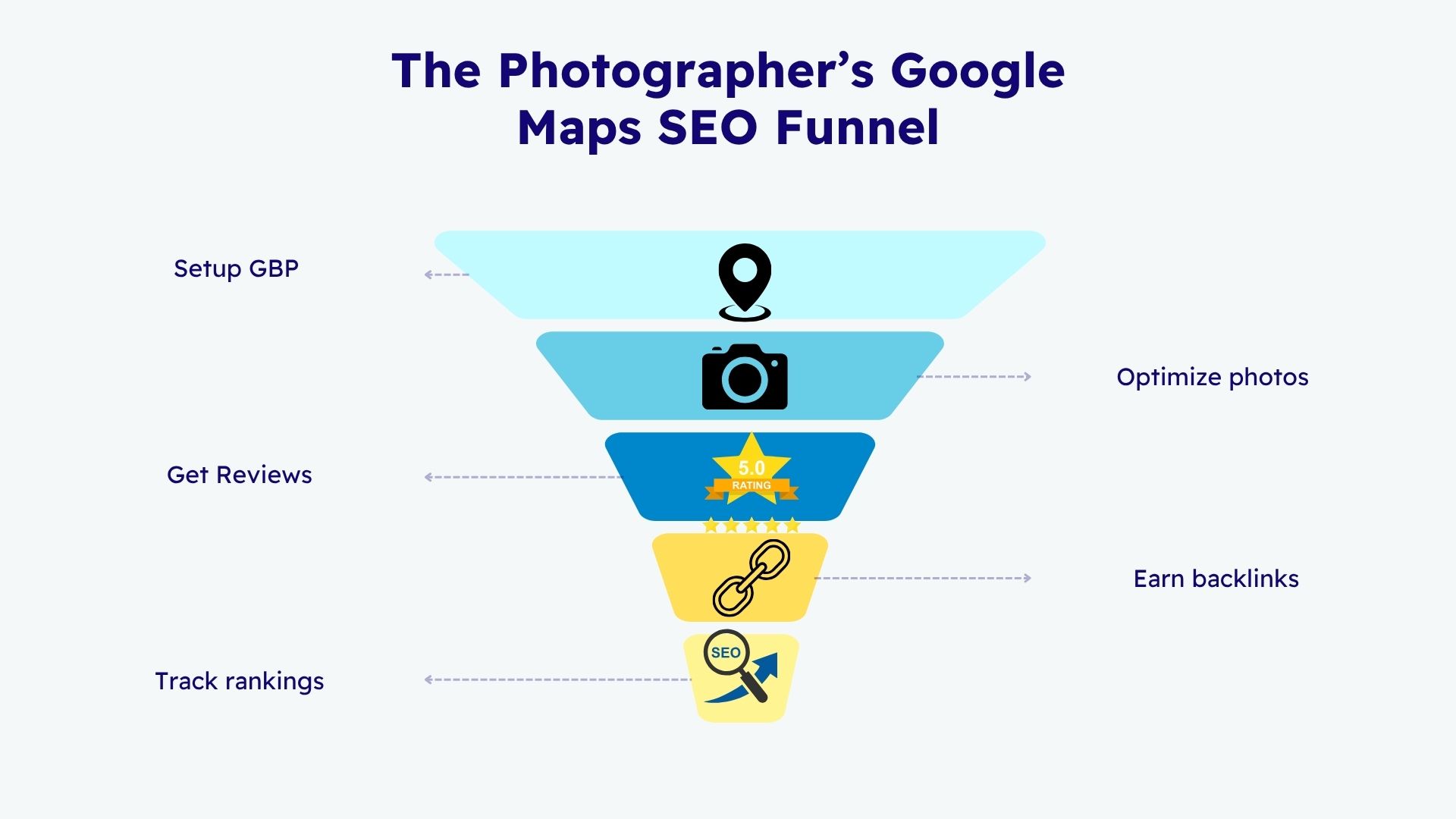
- Optimize your Google Business Profile (GBP) with accurate info and keywords.
- Use local SEO keywords on your profile and website.
- Add geo-tagged photos and optimize image data.
- Keep NAP (Name, Address, Phone) consistent across all listings.
- Collect genuine Google reviews and reply strategically.
- Build local backlinks from relevant sites and partners.
- Track performance monthly using local SEO tools.
Why Google Maps SEO Matters for Photographers in 2026
In 2026, ranking on Google Maps has become a crucial growth channel for local photographers. With over 70% of photography clients searching on Google before booking, visibility in the Local 3-Pack often decides who gets the job.
The Shift to Map-Based Search
Google’s focus on local intent means that even when users search “wedding photographer” or “photo studio near me,” they often see a Google Maps pack before any organic website results. That means your map ranking can drive inquiries without requiring visitors to even reach your site.
The Impact on Conversions
According to recent studies, businesses appearing in the Google Maps 3-Pack receive up to 44% more calls and 67% more direction requests than those outside of it. For photographers, that translates directly into more bookings and referrals.
SEO vs. Google Maps SEO
Traditional SEO focuses on ranking your website. Google Maps SEO (also called Local SEO) focuses on optimizing your Google Business Profile (GBP) so your listing appears in local map results. Both complement each other, but GBP optimization brings faster visibility for local businesses.
Example: A wedding photographer in New York might find it difficult to outrank international competitors in organic search, but with an optimized GBP, they can dominate for searches like “wedding photographer near New York.”
Also Read: How I Optimized 10 Photographers’ Google Business Profiles (Step-by-Step & Results)
Google Maps Ranking Factors Explained (What Actually Matters)
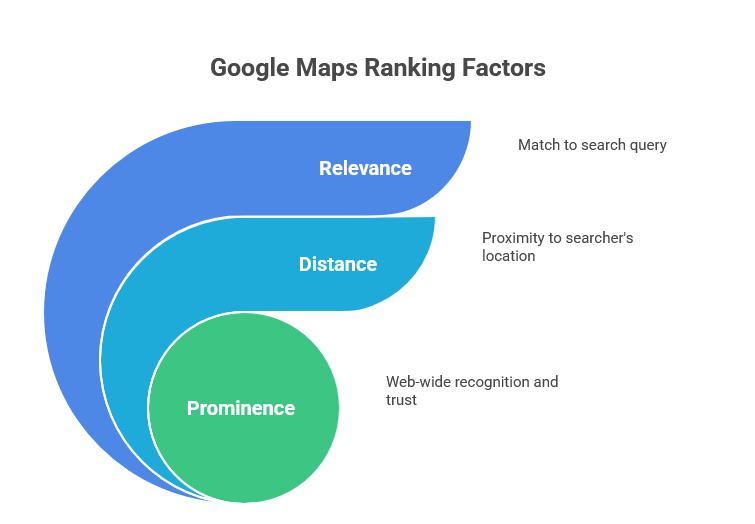
Before optimizing, it’s important to understand what signals Google considers when ranking a business on Maps. Google officially lists three core factors:
1. Relevance
How well your business listing matches what someone is searching for. This includes your category, description, and content you publish on GBP.
Optimization tip: Use your main keyword (e.g., “wedding photographer”) in your business description, services, and posts where relevant.
2. Distance
How close your business is to the searcher’s location. You can’t change where you’re based, but you can target surrounding service areas.
Optimization tip: Add multiple service areas in your GBP (e.g., neighborhoods or nearby cities) to extend your visibility range.
3. Prominence
This includes how well-known and trusted your business is across the web. Reviews, backlinks, citations, and mentions contribute to prominence.
Optimization tip: The more reviews, consistent listings, and local backlinks you have, the higher your prominence score.
Other (Unofficial but Proven) Ranking Signals
- Profile Completeness: Fully filled-out GBP fields perform better.
- Photo Activity: Regularly uploading new, high-quality images increases engagement.
- Review Velocity: A steady flow of recent reviews signals active business operations.
- Post Engagement: Google posts with high clicks and interactions may boost relevance.
Step 1: Optimize Your Google Business Profile (GBP)
Your Google Business Profile is the foundation of Google Maps SEO. Think of it as your digital storefront.
Choose the Right Category
Your primary category is one of the strongest ranking factors. Choose the most accurate and specific one for your services.
Best Categories for Photographers:
– Photographer
– Wedding Photographer
– Portrait Studio
– Commercial Photographer
– Event Photographer
You can add additional subcategories for niche services (e.g., newborn photography, drone photography, photo booth service).
Add Complete Business Information
Make sure your GBP includes:
– Business Name (no keyword stuffing)
– Address (accurate and verified)
– Phone Number (local number preferred)
– Website URL
– Business Hours
– Services
– Business Description (use local and service-related keywords naturally)
Write an Optimized Business Description
This is where you tell Google what your business does, using a conversational but keyword-focused tone.
Example: At Susan Shek Photography, we specialize in wedding and portrait photography in downtown New York. Our award-winning photographers capture timeless moments for couples, families, and brands across Central Park to Brooklyn rooftop vows.
Tips:
- Keep it between 250–750 characters.
- Mention your location, main services, and brand name.
- Avoid keyword stuffing; aim for natural flow.
Add Services and Products
List your main services (e.g., engagement shoots, event coverage, corporate headshots). Add descriptions for each with relevant keywords.
Example:
Service: Wedding Photography Packages
>Description: Full-day coverage with two photographers, drone shots, and same-day edit. Available in New York and nearby regions.
Upload High-Quality, Geo-Optimized Photos
Google prioritizes businesses with authentic, high-resolution photos. Upload a mix of:
- Team and behind-the-scenes shots
- Client sessions (with permission)
- Venue and location images
- Logo and studio exterior
Geo-tag each photo before uploading (embed location metadata in EXIF data). Tools like GeoImgr or LocaXYZ make this easy.
Use Google Posts Strategically
Post updates, offers, and new photo sessions regularly. Include:
- Local keywords (e.g., “engagement shoot in New York”)
- Calls to action (“Book Your Session”)
- Eye-catching images
Frequency: At least one post per week to stay active in Google’s algorithm.
Add Booking Links and CTAs
Add direct booking buttons (if available) or link to your website’s contact page. The easier it is for users to take action, the higher your conversion rate from Maps.
Enable Messaging
Turn on the “Message” feature inside GBP. Many clients prefer instant messaging over calls, and response speed influences engagement metrics.
Must Read: The Ultimate Guide: SEO for Wedding Photographers (Proven to Book More Clients)
Step 2: Master Local Keyword Research for Photographers
Your goal here is to find what potential clients are typing into Google Maps and search.
Use Google Autocomplete and PAA (People Also Ask)
Start typing terms like “wedding photographer” or “photo studio near” into Google and note autocomplete suggestions. These represent real search demand.
Example Searches:
- wedding photographer near me
- family photographer in New York
- best portrait studio near Central Park
Using Google Business Profile Insights
GBP Insights shows how people find your business (discovery vs. direct searches). Use this data to identify high-performing keywords and locations.
Tools for Local Keyword Research
- Google Keyword Planner – for monthly volume data.
- Ahrefs / SEMrush – for competitive keyword gaps.
- Local Falcon / BrightLocal – for heatmaps showing where you rank on Maps.
Keyword Mapping
Assign keywords to both your GBP and your website pages:
- GBP: short local terms (“wedding photographer New York”)
- Website: long-tail versions (“best outdoor pre-wedding photoshoot locations in New York”)
Semantic Keyword Integration
Include related LSI terms throughout your content: portrait photography, headshots, photo editing, studio session, local photographer, event coverage.
Pro Tip:
- GBP business description
- Blog post titles
- Photo ALT text
- Review responses
Step 3: Optimize Photos for Local SEO (The Visual Ranking Edge)
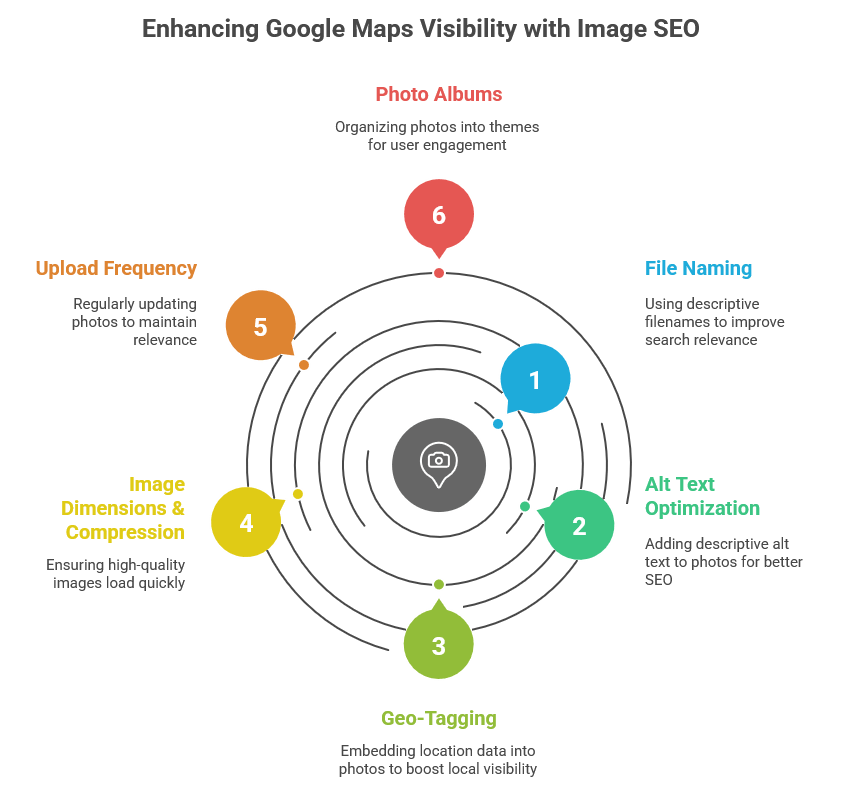
For photographers, images are not just portfolio material. They are SEO assets. Every photo you upload can strengthen your Google Maps visibility if optimized correctly. Google uses visual data (like EXIF, alt text, and engagement) to determine relevance and authenticity.
Why Image SEO Matters for Photographers
Google evaluates user engagement signals like photo views, clicks, and uploads. Businesses that frequently update their photo section often rank higher because Google assumes they are more active and relevant. For photographers, who naturally produce high-quality visuals, this is a built-in advantage.
Stat: According to Google, listings with photos get 42% more requests for directions and 35% more click-throughs to their websites.
Step-by-Step: Image Optimization for Google Maps
1. File Naming
Rename your photos using descriptive, keyword-rich filenames before uploading.
Example:
wedding-photographer-new york-central-park.jpg
Engagement- Photos- Dumbo- Brooklyn.jpg
Avoid generic names like IMG_1234.jpg.
2. Alt Text Optimization
If your photos appear on your website, add alt text that describes both the content and location.
Example: Bride and groom photoshoot at Central Park, New York wedding photographer.
3. Geo-Tagging (EXIF Data)
Add geographical coordinates to your photos. Tools like GeoImgr, Pic2Map, or LocaXYZ can embed location data (latitude and longitude) into EXIF metadata. When uploaded to GBP or your website, these help Google associate your photos with your business location.
4. Image Dimensions & Compression
Use high-quality images (minimum 1200px on the long edge), but compress them using tools like TinyPNG or Squoosh to ensure quick load times.
5. Upload Frequency
Upload new photos every 7-10 days. Google rewards consistent updates that indicate an active business.
6. Use Photo Albums for Context
Organize photos into specific themes (e.g., weddings, newborns, events). This helps users browse efficiently and increases time spent on your profile.
Advanced Image SEO Tips
- Add captions and context to photos on your website pages.
- Encourage clients to upload their photos with your business tagged (UGC = social proof).
- Use Google Posts with your new photos and link back to relevant pages.
- Avoid adding borders or text overlays that distract from visual content.
Step 4: Build NAP Consistency and Local Citations
Your Name, Address, and Phone Number (NAP) must be identical everywhere online. Inconsistent listings confuse Google and reduce your authority.
What Are Citations?
Citations are mentions of your business on third-party websites (directories, social profiles, industry platforms) that confirm your existence and contact information.
Importance of NAP Consistency
When your NAP details differ across sites (e.g., “SusanShek Photography” vs. “Susan Shek Photography”), Google may treat them as different entities, diluting ranking power. Consistency helps Google validate your business identity and improves local trust.
Where to Build Citations
Focus on high-authority directories relevant to photographers:
Global Directories
- Google Business Profile (primary)
- Bing Places
- Apple Maps
- Yelp
- Facebook Business
Photography-Specific Platforms
- WeddingWire
- The Knot
- PPA.com (Professional Photographers of America)
- Photo.net
- 500px Business Listings
Local Business Directories
- Yellow Pages
- Foursquare
- Local Chamber of Commerce
- Regional wedding/vendor listings
How to Audit Citations
Use tools like Whitespark, Moz Local, or BrightLocal to:
- Identify inconsistent or missing NAP entries.
- Track directory accuracy.
- Submit updated business info in bulk.
Pro Tip: Structured Data (Schema Markup)
Add LocalBusiness schema to your website to reinforce NAP consistency with machine-readable code.
Example JSON-LD:
{
“@context”: “https://schema.org”,
“@type”: “LocalBusiness”,
“name”: ” Susan Shek Photography “,
“image”: ” https://www.susanshek.com/wp-content/uploads/2020/12/logo1.png “,
“address”: {
“@type”: “PostalAddress”,
“streetAddress”: ” 401 Park Ave S #10/FL “,
“addressLocality”: ” NY “,
“postalCode”: “10016 “,
“addressCountry”: “USA”
},
“telephone”: “(347) 635-5577“,
“url”: “https://www.susanshek.com/”,
“priceRange”: “$$$”,
“openingHours”: “Mo-Sun – 24 hours”
}
This helps Google associate your website with your GBP listing.
Common Citation Mistakes
- Using different phone formats (e.g., (347) 635-5577 vs. 3476355577)
- Listing different suite or floor numbers
- Outdated websites or social links
- Incomplete categories or business descriptions
How to Fix NAP Issues
- Create a spreadsheet with all listings.
- Manually correct incorrect data.
- Contact directory support for locked profiles.
- Keep this spreadsheet as a quarterly audit checklist.
Bonus: Industry-Specific Citations
For photographers, these platforms often drive high-quality referral traffic:
- Wedding Maps (for wedding and engagement photographers)
- Eventective (for event photography)
- Peerspace (for studio rental visibility)
Step 5: Get More Google Reviews (and Make Them Rank)
Reviews are one of the strongest local ranking factors for Google Maps SEO. Google trusts what your customers say more than what you claim.
Why Reviews Matter for Photographers
- Authority: More 5-star reviews = higher credibility.
- Engagement: Reviews with keywords help you rank for those phrases.
- Conversion: 87% of consumers read at least one review before contacting a business.
How to Ask for Reviews (Ethically)
Use automated and personal methods together:
1. After the Project
Send a follow-up message 1–2 days after delivering the final gallery:
“Thank you for choosing Susan Shek Photography! It was a pleasure capturing your special day. If you loved your photos, could you share a quick review on Google? It really helps our small studio grow. [Insert review link]”
2. Include QR Codes
Display QR codes at your studio or on invoices linking directly to your GBP review form.
3. Automate with Email Tools
Use email automation (Mailchimp, ConvertKit) to send review requests to satisfied clients.
4. Ask for Keywords in Reviews (Subtly)
Encourage clients to mention services and locations:
“We loved our family photoshoot at Central Park by New York with Susan Shek Photography!”
These naturally include ranking keywords (family, photoshoot, location).
Respond to Every Review
Google measures engagement with your reviews. Respond professionally, using relevant keywords.
Example:
“Thank you, Sarah! We’re thrilled you loved your portrait photography session in Brooklyn rooftop vows. It was wonderful working with your family!”
How Many Reviews Do You Need?
There’s no magic number, but studies show listings with at least 30 recent reviews outperform those with fewer than 10. Focus on quality, quantity, and recency.
Review Velocity
Avoid getting 20 reviews in one week and then going silent. Aim for 2–3 new reviews per month consistently.
Handle Negative Reviews Gracefully
Never delete or argue. A thoughtful, solution-oriented response can even improve trust.
Example:
“We’re sorry your experience didn’t meet expectations. We’d love to discuss how we can make it right. Please contact us directly.”
Bonus: Showcase Reviews on Your Website
Embed Google review widgets or use plugins to display testimonials. This not only builds trust but also adds local SEO value to your website.
Step 6: Local Backlinks That Actually Work
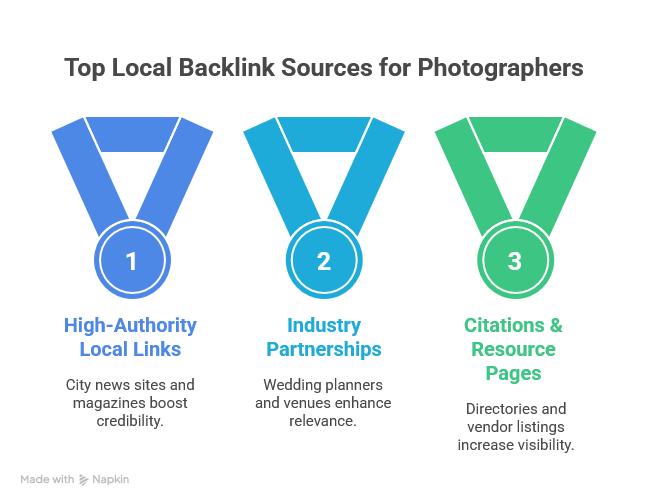
Backlinks remain one of the most powerful signals in Google’s local algorithm. For photographers, local backlinks validate that your business is credible and relevant in your area. These links tell Google: “This photographer is trusted by others nearby.”
Why Local Backlinks Matter for Google Maps SEO
Unlike traditional backlinks from random websites, local backlinks emphasize proximity and relevance. When a local business or event site links to you, it reinforces your prominence in that location.
Example: A New York wedding photographer featured on a local wedding blog or venue page earns authority in that specific region — signaling to Google that they deserve to rank higher in that area’s 3-pack.
The Backlink Hierarchy
- Tier 1: High-Authority Local Links – City news sites, magazines, chamber of commerce.
- Tier 2: Industry Partnerships – Wedding planners, florists, makeup artists, venues.
- Tier 3: Citations & Resource Pages – Directories, vendor listings, photography resources.
- Tier 4: Guest & Feature Links – Blog collaborations, photo features, interviews.
Easy Local Link Opportunities for Photographers
- Vendor Collaborations
Reach out to other local businesses in your ecosystem – florists, event planners, bridal boutiques. Offer to swap backlinks or be featured as a recommended photographer on their websites. - Venue Pages
Many wedding and event venues have a “Preferred Vendors” or “Partners” page. Contact them to be added. - Local Publications & Magazines
Pitch your work or client stories to local lifestyle blogs or city magazines. Example: “Top 10 Wedding Shoots at Central Park.” - Photography Associations & Groups
Join professional networks like PPA, Wedding Photographers Association, or WPPI, and list your business in their member directories. - Guest Blogging
Write helpful posts on partner blogs (e.g., “How to Plan the Perfect Engagement Shoot in New York”) and include a contextual link back to your site. - Sponsor Local Events
Support photography exhibitions or charity shoots. Local media usually link to sponsor sites.
Outreach Email Template
Subject: Feature idea for your wedding resources page
Hi [Name],
I’m [Your Name], a [Type of Photographer] based in [City]. I recently photographed a wedding at [Venue/Location] and created a resource guide your readers might love. Would you be open to featuring it on your [resource/vendor] page? I’d be happy to link back to you as well.
Cheers,
[Your Name]
[Website]
[Contact Info]
Bonus: Earn Links Through Data or Case Studies
Proud Marketer-style content wins links by providing unique data. For example:
- Conduct a small study: “Average Wedding Photography Costs in New York (2026)”.
- Publish results as a blog post and pitch it to wedding planners, news outlets, or photography blogs.
These attract organic backlinks because they provide value others want to reference.
Avoid Spammy Backlinks
Never buy links or use automated link farms. Google penalizes low-quality, irrelevant backlinks. Focus on genuine, geographically relevant ones.
Step 7: Track, Analyze, and Improve
Once your optimization is live, it’s time to measure performance. Proud Marketer always emphasizes data-driven SEO. Tracking helps identify what’s working and where to improve.
1. Use Google Business Profile Insights
GBP Insights shows how customers find your business and interact with your listing.
- Search Queries: See which keywords trigger your listing.
- Views: How many people saw your listing on Maps.
- Actions: Calls, direction requests, website clicks.
- Photo Views: Compare your photo performance vs. competitors.
Track improvements month over month to understand growth.
2. Use Rank Tracking Tools
Local rank tracking tools visualize your position in Maps for multiple areas.
- Local Falcon: Creates a geo-grid showing where your listing appears.
- BrightLocal: Tracks your visibility in Google Maps and local packs.
- GMBSpy: Analyzes competitor categories and keyword usage.
Check your map ranking across different zip codes or neighborhoods weekly.
3. Add UTM Parameters for Click Tracking
Add a UTM tag to your GBP website link so you can track how much traffic comes from Google Maps inside Google Analytics 4 (GA4).
Example UTM Link:
https:// susanshek.com/?utm_source=google&utm_medium=maps&utm_campaign=gbp
This will show up under traffic acquisition as a separate source.
4. Use Google Search Console
Track which keywords your site ranks for organically. Align those keywords with what users search on Google Maps to identify synergy opportunities.
5. Monitor Reviews and Engagement
Use tools like Whitespark Reputation Builder or Podium to get notified when new reviews arrive. Track average rating, review count, and sentiment.
6. Build a Monthly Optimization Routine
Monthly Tasks:
- Add 5 new geo-tagged photos.
- Publish 1 new Google post.
- Request 2 new reviews.
- Update 1 service description.
- Audit NAP and backlinks quarterly.
This ongoing activity sends freshness signals to Google, reinforcing your ranking stability.
7. Evaluate Conversions, Not Just Rankings
Ranking #1 means nothing if it doesn’t generate leads. Track:
- Calls made from Maps
- Direction requests
- Message interactions
- Website conversions
Use a call-tracking solution like CallRail or Twilio to measure ROI precisely.
8. Benchmark Competitors
Search your main keyword (e.g., “wedding photographer near me”) and study the top 3 listings:
- What categories do they use?
- How many reviews do they have?
- How many photos and posts?
Replicate what’s working – and improve on it.
Suggested Read: How to Partner with Local Businesses for Photography: A 10-Step System (+ 7 Outreach Email Templates)
Step 8: Future Trends — AI, Zero-Click, and Visual Search
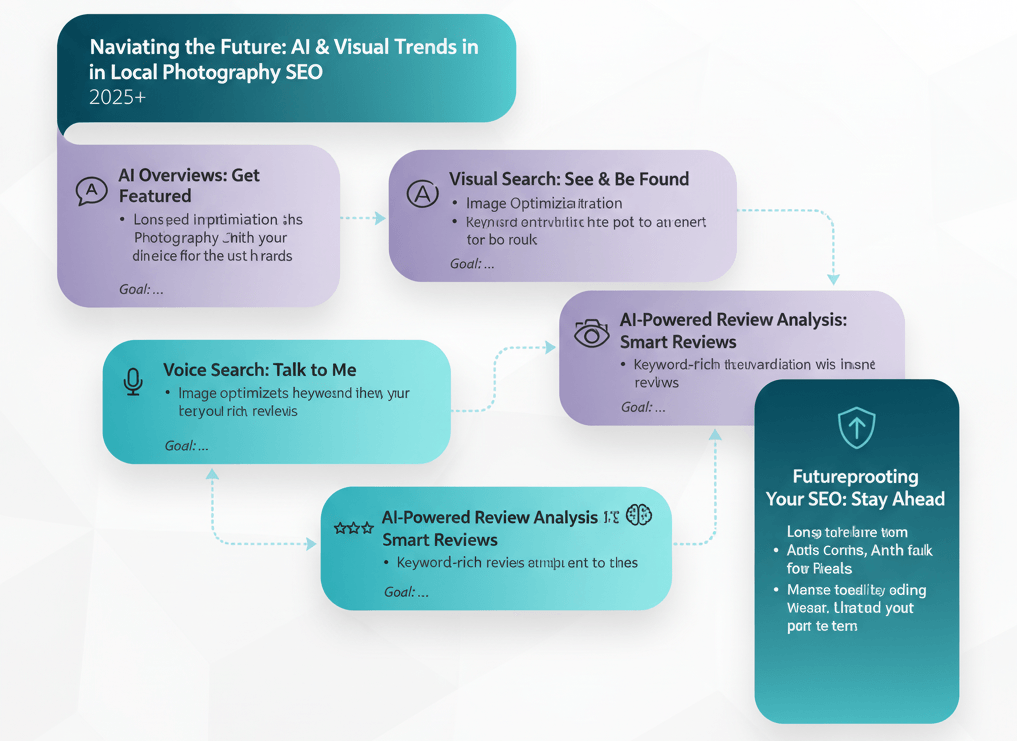
Google’s search experience is rapidly evolving, and 2026 brings new challenges (and opportunities) for local photographers.
AI Overviews Are Changing Local Search
Google’s AI-generated overviews now often appear above map results. These summaries pull data from GBP, reviews, and local websites. Businesses with structured data, strong engagement, and consistent content are more likely to be featured.
How to Optimize for AI Overviews:
- Keep GBP info detailed and current.
- Answer FAQs directly in posts and reviews.
- Use clear, conversational sentences (AI uses these to summarize info).
Voice Search & Conversational Queries
Searches like “Who’s the best wedding photographer near me?” are increasing. Optimize for natural language.
Example: Add sentences like, “We are one of the top-rated wedding photographers near New York, known for cinematic pre-wedding shoots.”
Visual Search Optimization
Tools like Google Lens are now connecting photos directly to Maps results. That means your optimized images might appear in visual search results.
Action Items:
- Add logo watermark subtly on images.
- Optimize EXIF and filenames for local context.
- Keep stylistic consistency (AI recognizes brands by visual patterns).
AI-Powered Review Analysis
Google is experimenting with AI summaries of reviews (e.g., “Customers mention professionalism and fast delivery”). Encourage keywords that describe your strengths in client reviews.
Futureproofing Your Local SEO
- Embrace AI writing tools for GBP posts and updates.
- Continue publishing locally relevant blog posts.
- Build an email list for remarketing and client retention.
- Encourage repeat clients to update reviews yearly.
Staying consistent and adapting early keeps your profile at the top of AI and Maps visibility.
FAQ Section (Schema-Optimized)
1. How long does it take to rank a photography business on Google Maps?
Usually 4–8 weeks, depending on competition and activity level. Consistent reviews, posts, and backlinks speed up the process.
2. Why doesn’t my photography studio appear on Google Maps?
Ensure your GBP is verified, category is correct, and address meets Google’s guidelines. Check for NAP inconsistencies.
3. What is the best Google Business category for photographers?
Choose the most specific category possible (e.g., Wedding Photographer over Photographer).
4. How can I add location keywords without keyword stuffing?
Mention areas naturally in your business description, photo captions, and posts.
5. Are paid Google Maps ads worth it for photographers?
Yes, but only if your GBP is already optimized. Paid visibility can boost traffic, but poor profiles waste ad spends.
Step 9: Website SEO Integration for Google Maps Rankings
Your website and Google Business Profile (GBP) are deeply interconnected. ProudMarkete’s philosophy always emphasizes a unified SEO ecosystem: optimizing both on-site and off-site elements so they amplify each other.
Why Your Website Impacts Google Maps SEO
Google uses your website as a key trust signal to validate your business’s credibility. If your website is well-optimized for local intent, it reinforces your GBP authority and helps you rank higher in both the local pack and organic search.
Key Website Ranking Factors for Photographers
- NAP Consistency: Ensure your Name, Address, and Phone Number are displayed exactly as they appear in your GBP.
- Embedded Google Map: Embed your GBP map on your contact page to strengthen location relevance.
- Local Landing Pages: Create individual pages for each service area (e.g., “Wedding Photographer in New York”).
- Fast Loading Speed: Compress images using TinyPNG or WebP format to maintain quality while reducing load times.
- Mobile Optimization: Over 70% of Google Maps searches are mobile based; ensure your site looks perfect on every device.
- Internal Linking: Use internal links to connect blog posts and service pages with your target keywords and areas.
- Structured Data: Include Local Business and Service schema for better context.
Example of Local Optimization in Action
If your photography studio is based in Singapore but you also serve nearby cities, create geo-targeted content:
- /Central- Park- Engagement- Photos/
- /sailing-engagement-photos-in-new-york/
- /west-village-engagement-photos/
Each page should include:
- Localized title and meta description
- A short paragraph mentioning nearby landmarks
- Client testimonials mentioning the area
- Embedded Google Map of the location
Pro Tip: Interlink GBP and Website Strategically
- Link from GBP to your homepage or main service area page.
- Add a backlink from your website footer to your GBP (use the “Share” link).
This mutual linking reinforces the entity relationship between your GBP and website.
Step 10: Content Marketing for Photographers
Proud Marketer’s method to dominate search results always revolves around value-first content that earns links and authority naturally. For photographers, content isn’t just blog posts. It’s visual storytelling optimized for local discovery.
1. Blog Topics That Rank and Attract Clients
Focus on intent-based keywords. What people are searching for before booking a photographer.
Examples:
- “Top 10 Wedding Photoshoot Locations in New York”
- “What to Wear for a Wedding Photoshoot”
- “How to Choose the Right Wedding Photographer in [City]”
- “Best Engagement Photoshoot Poses for Beginners”
Each article should target local intent by including phrases like “in New York”, “near Central Park”, etc.
2. Use Content Hubs
Group related posts into categories to build topical authority.
Example:
- Wedding Photography Hub: guides, venues, lighting tips, outfit ideas.
- Portrait Photography Hub: posing tips, editing tutorials, local studio insights.
This structure helps both users and Google navigate your expertise.
3. Add Visual Content and Schema
- Embed YouTube videos or reels showcasing your shoots.
- Include EXIF-optimized images for local keywords.
- Add ImageObject schema to photos on your website.
4. Create Shareable Content (Link Magnets)
Proud Marketer loves link magnets — content designed to earn backlinks.
Examples for photographers:
- “New York Wedding Photoshoot Checklist (Free PDF)”
- “Best 20 Poses for Pre-Wedding Shoots (with Visual Examples)”
- “The 2026 Wedding Photography Trends Report”
These attract both local brides and other photographers who may link to your resources.
5. Google Posts & Updates
Post weekly on your GBP to keep it active.
Content Ideas:
- New photoshoot sneak peeks
- Behind-the-scenes clips
- Mini blog summaries
- Promotions (e.g., “Valentine’s Couple Shoot Offer”)
Each post should include a keyword and call-to-action like “Call now” or “Get directions.”
Further Read: How to Become a Photographer (Even Without a Degree): A Complete 2026 Guide
Step 11: Social Proof and Brand Authority Building
Google’s local ranking algorithm increasingly rewards brand entities. Social signals, mentions, and consistent branding across the web tell Google your business is trustworthy.
Build Multi-Platform Consistency
Use the same handle, bio, and visuals on:
- Facebook Business Page
- Pinterest (for portfolio)
- LinkedIn (for corporate shoots)
- YouTube (for BTS and vlogs)
Ensure all profiles link back to your website and GBP.
Encourage Branded Searches
When people search directly for your brand (e.g., “Susan Shek Photography New York”), it boosts brand authority. This often happens when your content performs well across multiple channels.
Leverage Press Mentions
Feature in local news or blogs using HARO (Help a Reporter Out) or niche-specific PR services. Even one local press feature can skyrocket your authority in Google’s local algorithm.
Build a Review Ecosystem
Repurpose 5-star reviews as social media posts, testimonials, or video highlights. This reinforces authenticity and encourages more user engagement.
Step 12: Maintenance & Long-Term Growth Strategy
Google Maps SEO isn’t a one-time project; it’s an ongoing process. Maintaining momentum requires a consistent rhythm of updates and data-driven refinements.
Monthly Maintenance Checklist
- ✅ Upload 5 new photos (geo-tagged)
- ✅ Publish 1 GBP post
- ✅ Request 2 new reviews
- ✅ Check and fix any citation inconsistencies
- ✅ Review analytics and ranking trends
Quarterly Optimization
- Revisit your top 3 keywords
- Update metadata for seasonality (e.g., “Christmas Photoshoot 2026”)
- Test a new call-to-action (e.g., “Book Your Session Now”)
Yearly Growth Strategy
- Create a new lead magnet (eBook or checklist)
- Launch seasonal campaigns
- Update all NAP details and categories if services evolve
- Expand to new service areas with fresh landing pages
Step 13: Common SEO Mistakes Photographers Should Avoid
Even small errors can hold back your local rankings. Here are Proud Marketer’s top pitfalls to avoid:
- Ignoring Reviews — Unanswered or negative reviews hurt engagement signals.
- Duplicate Listings — Multiple GBPs for the same business confuse Google.
- Keyword Stuffing — Over-optimization in descriptions or posts can lower trust.
- No Regular Updates — Inactivity signals low relevance.
- Broken Website Links — Outdated URLs or SSL issues kill credibility.
- Unoptimized Photos — Missing EXIF, bad filenames, or oversized images slow down rankings.
- Ignoring Insights Data — Not analysing performance means missed opportunities.
Step 14: Case Studies — From Hidden to #1 on Google Maps
Business: Susan Shek Photography
Location: New York City, NY
Website: https://www.susanshek.com
Objective
Enhance online visibility and attract more local clients in the competitive NYC wedding photography market.
Strategy Implemented
- Google Business Profile Optimization: Fully optimized with accurate business information, high-quality photos, and relevant keywords.
- Local Keyword Targeting: Incorporated local keywords such as “NYC wedding photographer” into website content and metadata.
- Content Marketing: Developed a blog featuring articles like “101 Engagement Photo Locations in NYC” and “10 of the Best NYC Wedding Venues.”
- Client Reviews and Testimonials: Encouraged satisfied clients to leave positive reviews on Google and other platforms.
Results Achieved
- Improved Google Maps Rankings: Achieved higher rankings for targeted keywords, leading to increased visibility among local clients.
- Increased Client Inquiries: Noticed a surge in client inquiries and bookings, attributed to enhanced online presence.
- Positive Client Feedback: Received numerous positive reviews and testimonials, further establishing her reputation as a trusted wedding photographer in NYC.
Key Takeaways
- Consistency in Profile Updates: Regularly updating the Google Business Profile with fresh content and client testimonials is crucial for maintaining and improving local search rankings.
- Importance of Local Content: Creating content that is relevant to the local community can attract potential clients and enhance SEO.
- Client Engagement: Actively engaging with clients and encouraging them to leave reviews can significantly impact online reputation and search engine visibility.
Step 15: The Ultimate Google Maps SEO Checklist (2026 Edition)
Google Business Profile
- Verified listing
- Main & secondary categories optimized
- 100% profile completion
- Service areas defined
- 20+ geo-tagged photos uploaded
Website SEO
- NAP consistency
- Local landing pages for each area
- Fast, mobile-friendly design
- Structured data (LocalBusiness schema)
Reviews & Engagement
- 30+ 5-star reviews
- Weekly GBP post updates
- Personalized responses to reviews
Backlinks & Citations
- 10+ local vendor backlinks
- Consistent directory listings
- No duplicate or outdated citations
Tracking & Optimization
- GBP Insights reviewed monthly
- Local keyword rankings tracked
- Analytics + UTM parameters set up
Conclusion: Mastering Google Maps SEO as a Photographer
Ranking in Google Maps in 2026 requires more than just setting up a listing — it’s about building a trusted digital ecosystem. Photographers who combine technical optimization, visual storytelling, and consistent engagement dominate local search.
When done right, Google Maps SEO becomes your 24/7 lead machine, turning searchers into lifelong clients.
Remember Backlinko’s golden rule: Consistency beats intensity. Don’t try to do everything at once. Instead, keep refining each layer — your photos, reviews, backlinks, and website — one month at a time.
By implementing this full-stack strategy, you’re not just ranking higher; you’re creating a brand that Google (and your clients) can’t ignore.